<?xml version="1.0" encoding="UTF-8"?>
<feed version="0.3" xmlns="http://purl.org/atom/ns#" xmlns:dc="http://purl.org/dc/elements/1.1/" xml:lang="ja">
<title>DEEP KICK.com</title>
<link rel="alternate" type="text/html" href="https://deepkick.com/" />
<modified>2017-12-16T05:10:46Z</modified>
<tagline>iOSアプリ開発者として京都を拠点に活動をしている本多 郁（Kaoru Honda）のオフィス【DEEP KICK.com】。これまでに出版した書籍やプロジェクトなどをご紹介しています。</tagline>
<id>tag:deepkick.com,2019://18</id>
<generator url="http://www.movabletype.org/" version="4.1">Movable Type</generator>
<copyright>Copyright (c) 2017, kaoru</copyright>

<entry>
<title>登山・防災用GPSオフラインマップアプリ：SkyWalkingの紹介ムービー</title>
<link rel="alternate" type="text/html" href="https://deepkick.com/archives/1000news/gpsskywalking_1.html" />
<modified>2017-12-16T05:10:46Z</modified>
<issued>2017-12-16T04:53:50Z</issued>
<id>tag:deepkick.com,2017://18.2594</id>
<created>2017-12-16T04:53:50Z</created>
<summary type="text/plain">登山・防災用GPSオフラインマップアプリ：SkyWalkingの紹介ムービー</summary>
<author>
<name>kaoru</name>
<url>https://deepkick.com/</url>
<email>kaoru@deepkick.com</email>
</author>
<dc:subject>1000News</dc:subject>
<content type="text/html" mode="escaped" xml:lang="ja" xml:base="https://deepkick.com/">
<![CDATA[<p>
SkyWalkingの主要な機能を紹介する約4分の動画です。
<p>

<div style="margin: 20px auto 20px;">
<iframe width="480" height="270" src="https://www.youtube.com/embed/Kx5qgyTRgh8" frameborder="0" allowfullscreen></iframe>
</div>

<p>
SkyWalkingは、山岳地帯など、ネットに接続できない環境での道迷いを防止することを目的として私が開発しているアプリで、iOS端末（iPhone, iPadですね）で利用できます。国土地理院防災アプリケーション審査委員会が公募した防災アプリとして高い評価を受け、平成28年度、29年度と連続して防災アプリ賞を受賞。機能制限版は無料で利用できます。iPhoneユーザーの方は、ぜひApp Storeからダウンロードしてみてください。
アプリのダウンロードや使い方などの詳細は、下記SkyWalking オフィシャルサイトをご覧ください。</p>
<p>
→ <a href="/skywalking/">SkyWalking オフィシャルサイト</a><br />
→ <a href="https://twitter.com/skywalkingapp">SkyWalking Twitter</a><br />
→ <a href="https://www.facebook.com/skywalkingapp/?pnref=story">SkyWalking FaceBook</a>
</p>

<p>
SkyWalking は、下記App Storeからダウンロードできます。
</p>

<a href="https://itunes.apple.com/jp/app/skywalking/id1090323263?mt=8&ign-mpt=uo%3D4" target="itunes_store">
<img style="margin: 20px 20px 20px 0px; border: 0px;" src="/img/App_Store_Badge_JP_135x40.png" />
</a>]]>

</content>
</entry>

<entry>
<title>G空間EXPO 2017にSkyWalkingを出展・デモを行います</title>
<link rel="alternate" type="text/html" href="https://deepkick.com/archives/1000news/gexpo_2017skywa.html" />
<modified>2017-10-08T23:51:07Z</modified>
<issued>2017-10-08T23:27:19Z</issued>
<id>tag:deepkick.com,2017://18.2593</id>
<created>2017-10-08T23:27:19Z</created>
<summary type="text/plain">G空間EXPO 2017の「地理空間情報フォーラム」に設けられる「防災アプリ審査委員会」のブースにおいて、SkyWalkingも展示されます。</summary>
<author>
<name>kaoru</name>
<url>https://deepkick.com/</url>
<email>kaoru@deepkick.com</email>
</author>
<dc:subject>1000News</dc:subject>
<content type="text/html" mode="escaped" xml:lang="ja" xml:base="https://deepkick.com/">
<![CDATA[<p>
<a href="http://www.g-expo.jp" target="_blank">
<img alt="G空間EXPO 2017" src="https://deepkick.com/skywalking/img/g_kukan_expo_220x95.png" style="border: 0px;" />
</a>
</p>

<p>
10/12（木） - 10/14（土）に、東京・お台場の日本科学未来館で、G空間EXPO 2017が開催されます。「地理空間情報科学で未来をつくる」がテーマのイベントで、入場無料。どなたでも参加できます。<br />
<a href="http://www.g-expo.jp" target="_blank">http://www.g-expo.jp</a>
</p>

<p>
国土地理院の<a href="http://www.gsi.go.jp/bousaichiri/bousai-app-2017_00011.html" target="_blank">「平成29年度防災アプリ賞」</a>を受賞した<a href="https://deepkick.com/skywalking/" target="_blank">登山・防災用GPSオフラインマップアプリ：SkyWalking</a>ですが、今年のG空間EXPO内の<a href="http://www.g-expo.jp/forum/exhi_vender.html" target="_blank">「地理空間情報フォーラム」</a>に設けられる「防災アプリ審査委員会」のブース（No.11）において、他の受賞アプリとともにSkyWalkingも展示されます。フォーラムの詳細やブースの位置は下記を参考ください。<br />
<a href="http://www.g-expo.jp/forum/exhi_vender.html" target="_blank">http://www.g-expo.jp/forum/exhi_vender.html</a>
</p>

<p>
SkyWalking は、下記App Storeからダウンロードできます。
</p>

<a href="https://itunes.apple.com/jp/app/skywalking/id1090323263?mt=8&ign-mpt=uo%3D4" target="itunes_store">
<img style="margin: 20px 20px 20px 0px; border: 0px;" src="/img/App_Store_Badge_JP_135x40.png" />
</a>]]>
<![CDATA[<?php
	if ((preg_match("/iPhone/", $_SERVER['HTTP_USER_AGENT'])) || (preg_match("/iPod/", $_SERVER['HTTP_USER_AGENT']))) {
		////////////////////////////to iPhone / iPod
		echo '

<p>
私は10/13（金）と10/14（土）の2日間、会場のブースに赴きまして、開発者としてSkyWalkingのデモやPRを行います。今はその準備と、SkyWalking次期バージョン1.18の新規機能の開発に追われておりますが、G空間EXPOにデモをする側として参加できることを非常に楽しみにしております。
</p>

<p>
G空間EXPOは、毎年新しい発見や知識を得ることができる非常にエキサイティングなイベントで、地図や地理空間情報に関心のある方には、ぜひおすすめなイベントです。会場にご来場された方は、ぜひ防災アプリ審査委員会のブースにもお立ち寄りくださいませ。<br />
以上、G空間EXPO 2017のお知らせでした。
</p>

<p>
→ G空間EXPO 2017の詳細は、<a href="http://www.g-expo.jp" target="_blank">G空間EXPO 2017</a><br />
→ SkyWalkingの詳細は、<a href="/skywalking/">SkyWalking オフィシャルサイト</a><br />
</p>

		';
	} else {
		////////////////////////////to PC
		echo '

<p>
私は10/13（金）と10/14（土）の2日間、会場のブースに赴きまして、開発者としてSkyWalkingのデモやPRを行います。今はその準備と、SkyWalking次期バージョン1.18の新規機能の開発に追われておりますが、G空間EXPOにデモをする側として参加できることを非常に楽しみにしております。
</p>

<p>
G空間EXPOは、毎年新しい発見や知識を得ることができる非常にエキサイティングなイベントで、地図や地理空間情報に関心のある方には、ぜひおすすめなイベントです。会場にご来場された方は、ぜひ防災アプリ審査委員会のブースにもお立ち寄りくださいませ。<br />
以上、G空間EXPO 2017のお知らせでした。
</p>

<p class="posted"></p>

<p>
→ G空間EXPO 2017の詳細は、<a href="http://www.g-expo.jp" target="_blank">G空間EXPO 2017</a><br />
→ SkyWalkingの詳細は、<a href="/skywalking/">SkyWalking オフィシャルサイト</a><br />
</p>


		';
	}
?>]]>
</content>
</entry>

<entry>
<title>登山・防災用GPSオフラインマップアプリ：SkyWalking が、２年連続で国土地理院・平成29年度防災アプリ賞を受賞</title>
<link rel="alternate" type="text/html" href="https://deepkick.com/archives/1000news/gpsskywalking_2_1.html" />
<modified>2017-09-29T11:18:53Z</modified>
<issued>2017-09-29T11:07:23Z</issued>
<id>tag:deepkick.com,2017://18.2592</id>
<created>2017-09-29T11:07:23Z</created>
<summary type="text/plain">登山・防災用GPSオフラインマップアプリ：SkyWalking が、平成29年度防災アプリ賞を受賞</summary>
<author>
<name>kaoru</name>
<url>https://deepkick.com/</url>
<email>kaoru@deepkick.com</email>
</author>
<dc:subject>1000News</dc:subject>
<content type="text/html" mode="escaped" xml:lang="ja" xml:base="https://deepkick.com/">
<![CDATA[<a href="https://itunes.apple.com/jp/app/skywalking/id1090323263?mt=8&ign-mpt=uo%3D4" target="itunes_store">
<img alt="登山・防災用GPSオフラインマップ・SkyWalking" src="https://deepkick.com/skywalking/img/Icon_130.png" style="border: 0px;" />
</a>
<div class="portBox">

<p>
登山・防災用GPSオフラインマップアプリ・SkyWalking が、国土地理院防災アプリケーション審査委員会が公募した防災アプリとして高い評価を受け、昨年に続き本年も<a href="http://www.gsi.go.jp/bousaichiri/bousai-app-2017_00011.html">平成29年度防災アプリ賞</a>を受賞しました。
</p>

<a href="https://itunes.apple.com/jp/app/skywalking/id1090323263?mt=8&ign-mpt=uo%3D4" target="itunes_store">
<img style="margin: 20px 20px 20px 0px; border: 0px;" src="/img/App_Store_Badge_JP_135x40.png" />
</a>

</div>
]]>
<![CDATA[<?php
	if ((preg_match("/iPhone/", $_SERVER['HTTP_USER_AGENT'])) || (preg_match("/iPod/", $_SERVER['HTTP_USER_AGENT']))) {
		////////////////////////////to iPhone / iPod
		echo '

<p>
国土地理院の<a href="http://www.gsi.go.jp/bousaichiri/bousaichiri61013.html">「平成29年度防災アプリを公募」</a>に、応募した「SkyWalking」が、昨年に続き平成29年度防災アプリ賞を受賞しました。詳細は、<a href="http://www.gsi.go.jp/bousaichiri/bousai-app-2017_00011.html">国土地理院サイト　「平成29年度防災アプリ審査委員会：審査委員会で選定した６つの防災アプリ」</a>をご覧ください。
</p>

<p>
今回受賞したSkyWalkingは、昨年度受賞した「地点別浸水シミュレーション検索システム（浸水ナビ）」APIを使った浸水シミュレーション機能に加えて、国土地理院が提供しているオープンデータ「指定緊急避難場所API」からダウンロードした指定緊急避難場所データを地図上に表示する機能や、任意の地点から指定緊急避難場所への経路を検索できる機能など、防災機能を強化した点が評価されました。SkyWalkingの防災機能は、無料版も機能制限がなく利用することができますので、iPhone/iPadユーザーの方はぜひ使ってみてください。
</p>

<p>
SkyWalking は、下記App Storeからダウンロードできます。
</p>

<p>
<a href="https://itunes.apple.com/jp/app/skywalking/id1090323263?mt=8&ign-mpt=uo%3D4" target="itunes_store">このアプリをiTunes Storeでチェック</a>
</p>

<p>
→ 詳細は、<a href="/skywalking/">SkyWalking オフィシャルサイト</a><br />
→ <a href="https://twitter.com/skywalkingapp">SkyWalking Twitter</a><br />
→ <a href="https://www.facebook.com/skywalkingapp/?pnref=story">SkyWalking FaceBook</a>
</p>

		';
	} else {
		////////////////////////////to PC
		echo '

<p>
国土地理院の<a href="http://www.gsi.go.jp/bousaichiri/bousaichiri61013.html">「平成29年度防災アプリを公募」</a>に、応募した「SkyWalking」が、昨年に続き平成29年度防災アプリ賞を受賞しました。詳細は、<a href="http://www.gsi.go.jp/bousaichiri/bousai-app-2017_00011.html">国土地理院サイト　「平成29年度防災アプリ審査委員会：審査委員会で選定した６つの防災アプリ」</a>をご覧ください。
</p>

<p>
今回受賞したSkyWalkingは、昨年度受賞した「地点別浸水シミュレーション検索システム（浸水ナビ）」APIを使った浸水シミュレーション機能に加えて、国土地理院が提供しているオープンデータ「指定緊急避難場所API」からダウンロードした指定緊急避難場所データを地図上に表示する機能や、任意の地点から指定緊急避難場所への経路を検索できる機能など、防災機能を強化した点が評価されました。SkyWalkingの防災機能は、無料版も機能制限がなく利用することができますので、iPhone/iPadユーザーの方はぜひ使ってみてください。
</p>

<p>
SkyWalking は、下記App Storeからダウンロードできます。
</p>

<p class="posted"></p>

<div class="image_button">
	<ul>
		<li class="btn1">
			<a href="https://itunes.apple.com/jp/app/skywalking/id1090323263?mt=8&ign-mpt=uo%3D4" target="itunes_store">
				このアプリをiTunes Storeでチェック
			</a>
		</li>
	</ul>
</div>
<p class="posted"></p>

<p>
→ 詳細は、<a href="/skywalking/">SkyWalking オフィシャルサイト</a><br />
→ <a href="https://twitter.com/skywalkingapp">SkyWalking Twitter</a><br />
→ <a href="https://www.facebook.com/skywalkingapp/?pnref=story">SkyWalking FaceBook</a>
</p>


		';
	}
?>]]>
</content>
</entry>

<entry>
<title>登山・防災用GPSオフラインマップアプリ：SkyWalking が、平成28年度防災アプリ賞を受賞</title>
<link rel="alternate" type="text/html" href="https://deepkick.com/archives/1000news/gpsskywalking_2.html" />
<modified>2016-12-17T14:09:07Z</modified>
<issued>2016-12-17T13:09:29Z</issued>
<id>tag:deepkick.com,2016://18.2591</id>
<created>2016-12-17T13:09:29Z</created>
<summary type="text/plain">登山・防災用GPSオフラインマップアプリ：SkyWalking が、平成28年度防災アプリ賞を受賞</summary>
<author>
<name>kaoru</name>
<url>https://deepkick.com/</url>
<email>kaoru@deepkick.com</email>
</author>
<dc:subject>1000News</dc:subject>
<content type="text/html" mode="escaped" xml:lang="ja" xml:base="https://deepkick.com/">
<![CDATA[<a href="https://itunes.apple.com/jp/app/skywalking/id1090323263?mt=8&ign-mpt=uo%3D4" target="itunes_store">
<img alt="登山・防災用GPSオフラインマップ・SkyWalking" src="https://deepkick.com/skywalking/img/Icon_130.png" style="border: 0px;" />
</a>
<div class="portBox">

<p>
登山・防災用GPSオフラインマップアプリ・SkyWalking が、国土地理院防災アプリケーション審査委員会が公募した防災アプリとして高い評価を受け、<a href="http://www.gsi.go.jp/bousaichiri/bousai-app-2016.html">平成28年度防災アプリ賞</a>を受賞しました。
</p>

<a href="https://itunes.apple.com/jp/app/skywalking/id1090323263?mt=8&ign-mpt=uo%3D4" target="itunes_store">
<img style="margin: 20px 20px 20px 0px; border: 0px;" src="/img/App_Store_Badge_JP_135x40.png" />
</a>

</div>
]]>
<![CDATA[<?php
	if ((preg_match("/iPhone/", $_SERVER['HTTP_USER_AGENT'])) || (preg_match("/iPod/", $_SERVER['HTTP_USER_AGENT']))) {
		////////////////////////////to iPhone / iPod
		echo '

<p>
国土地理院の<a href="http://www.gsi.go.jp/bousaichiri/bousaichiri60025.html">「時系列の浸水想定情報等を活用した防災アプリを公募」</a>に、応募した「SkyWalking（浸水シミュレーション機能追加バージョン）」が、平成28年度防災アプリ賞を受賞しました。詳細は、<a href="http://www.gsi.go.jp/bousaichiri/bousai-app-2016.html">国土地理院サイト　平成28年度防災アプリ審査委員会：審査委員会で選定した５つの防災アプリ</a>をご覧ください。
</p>

<p>
今回、受賞した「浸水シミュレーション機能」は、国土交通省が提供している「地点別浸水シミュレーション検索システム（浸水ナビ）」及びこれを利用するためのAPIから、大雨などによる増水で河川が決壊した地点（破堤点といいます）を想定し、どのように浸水が進んでいくのかをシミュレーションするデータを取得し、従来のSkyWalking のマップ上に表示するというものです。
</p>

<p>
「浸水シミュレーション機能」を実装したSkyWalking は、現在App Storeでの公開を準備中です。進展がありましたら、お知らせします。
</p>

<p>
<a href="https://itunes.apple.com/jp/app/skywalking/id1090323263?mt=8&ign-mpt=uo%3D4" target="itunes_store">このアプリをiTunes Storeでチェック</a>
</p>

<p>
→ 詳細は、<a href="/skywalking/">SkyWalking オフィシャルサイト</a><br />
→ <a href="https://twitter.com/skywalkingapp">SkyWalking Twitter</a><br />
→ <a href="https://www.facebook.com/skywalkingapp/?pnref=story">SkyWalking FaceBook</a>
</p>

		';
	} else {
		////////////////////////////to PC
		echo '

<p>
国土地理院の<a href="http://www.gsi.go.jp/bousaichiri/bousaichiri60025.html">「時系列の浸水想定情報等を活用した防災アプリを公募」</a>に、応募した「SkyWalking（浸水シミュレーション機能追加バージョン）」が、平成28年度防災アプリ賞を受賞しました。詳細は、<a href="http://www.gsi.go.jp/bousaichiri/bousai-app-2016.html">国土地理院サイト　平成28年度防災アプリ審査委員会：審査委員会で選定した５つの防災アプリ</a>をご覧ください。
</p>

<p>
今回、受賞した「浸水シミュレーション機能」は、国土交通省が提供している「地点別浸水シミュレーション検索システム（浸水ナビ）」及びこれを利用するためのAPIから、大雨などによる増水で河川が決壊した地点（破堤点といいます）を想定し、どのように浸水が進んでいくのかをシミュレーションするデータを取得し、従来のSkyWalking のマップ上に表示するというものです。
</p>

<p>
「浸水シミュレーション機能」を実装したSkyWalking は、現在App Storeでの公開を準備中です。進展がありましたら、お知らせします。
</p>

<p class="posted"></p>

<div class="image_button">
	<ul>
		<li class="btn1">
			<a href="https://itunes.apple.com/jp/app/skywalking/id1090323263?mt=8&ign-mpt=uo%3D4" target="itunes_store">
				このアプリをiTunes Storeでチェック
			</a>
		</li>
	</ul>
</div>
<p class="posted"></p>

<p>
→ 詳細は、<a href="/skywalking/">SkyWalking オフィシャルサイト</a><br />
→ <a href="https://twitter.com/skywalkingapp">SkyWalking Twitter</a><br />
→ <a href="https://www.facebook.com/skywalkingapp/?pnref=story">SkyWalking FaceBook</a>
</p>


		';
	}
?>]]>
</content>
</entry>

<entry>
<title>第5回 地理院地図パートナーネットワーク会議が開催されました</title>
<link rel="alternate" type="text/html" href="https://deepkick.com/archives/1000news/5_1.html" />
<modified>2016-06-08T23:23:54Z</modified>
<issued>2016-06-08T04:09:09Z</issued>
<id>tag:deepkick.com,2016://18.2589</id>
<created>2016-06-08T04:09:09Z</created>
<summary type="text/plain">第5回地理院地図パートナーネットワーク会議にて、SkyWalking 開発者の私DEEP KICK.com 本多が、「地理院タイルを使ったオフライン地図作成機能」というテーマで、プレゼンしました。</summary>
<author>
<name>kaoru</name>
<url>https://deepkick.com/</url>
<email>kaoru@deepkick.com</email>
</author>
<dc:subject>1000News</dc:subject>
<content type="text/html" mode="escaped" xml:lang="ja" xml:base="https://deepkick.com/">
<![CDATA[<a href="http://ccpn.gsi.go.jp">
<img alt="地理院タイルを使ったオフライン地図作成機能" src="https://deepkick.com/skywalking/img/skywalking_thumbnail_slideshare_130_114.png" style="border: 0px;" />
</a>
<div class="portBox">

<p>
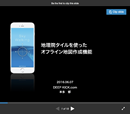
国土地理院が主催する<a href="http://ccpn.gsi.go.jp">「第5回地理院地図パートナーネットワーク会議」</a>が2016年6月7日、東京において開催され、<a href="https://deepkick.com/skywalking/">登山・防災用GPSオフラインマップ iOSアプリ・SkyWalking</a> 開発者の私DEEP KICK.com 本多が、「地理院タイルを使ったオフライン地図作成機能」というテーマで発表してきました。発表に使用したスライドをSlideShareで公開していますので、ご興味のある方はご覧ください。
</p>
<p>
<a href="http://www.slideshare.net/deepkaoru/gps-skywalking">「地理院タイルを使ったオフライン地図作成機能」発表スライド</a>
</p>


</div>]]>
<![CDATA[<?php
	if ((preg_match("/iPhone/", $_SERVER['HTTP_USER_AGENT'])) || (preg_match("/iPod/", $_SERVER['HTTP_USER_AGENT']))) {
		////////////////////////////to iPhone / iPod
		echo '

<p>
主催者の国土地理院からの最新情報をはじめ、地理空間情報に携わる研究機関・民間企業・アプリ開発者など、様々な活動をされているプレゼンテーターによる地理院タイルを使った事例紹介の発表が行われました。私は昨年11月に行われた第４回会議に初めて一般参加させていただきましたが、今回は発表者の一人として参加させていただきました。<br />
会議で発表されたスライドなどの資料が、下記国土地理院のサイトで公開されておりますので、地理空間情報に興味のある方はご覧ください。
</p>
<p>
<a href="http://ccpn.gsi.go.jp">第5回地理院地図パートナーネットワーク会議</a><br />
</p>

		';
	} else {
		////////////////////////////to PC
		echo '

<p>
主催者の国土地理院からの最新情報をはじめ、地理空間情報に携わる研究機関・民間企業・アプリ開発者など、様々な活動をされているプレゼンテーターによる地理院タイルを使った事例紹介の発表が行われました。私は昨年11月に行われた第４回会議に初めて一般参加させていただきましたが、今回は発表者の一人として参加させていただきました。<br />
会議で発表されたスライドなどの資料が、下記国土地理院のサイトで公開されておりますので、地理空間情報に興味のある方はご覧ください。
</p>
<p>
<a href="http://ccpn.gsi.go.jp">第5回地理院地図パートナーネットワーク会議</a><br />
</p>

<p class="posted"></p>

		';
	}
?>]]>
</content>
</entry>

<entry>
<title>第5回 地理院地図パートナーネットワーク会議で発表します</title>
<link rel="alternate" type="text/html" href="https://deepkick.com/archives/1000news/5.html" />
<modified>2016-06-03T01:53:35Z</modified>
<issued>2016-05-25T14:22:33Z</issued>
<id>tag:deepkick.com,2016://18.2587</id>
<created>2016-05-25T14:22:33Z</created>
<summary type="text/plain">第5回地理院地図パートナーネットワーク会議にて、SkyWalking 開発者の私DEEP KICK.com 本多が、「地理院タイルを使ったオフライン地図作成機能の紹介」というテーマで、プレゼンします。</summary>
<author>
<name>kaoru</name>
<url>https://deepkick.com/</url>
<email>kaoru@deepkick.com</email>
</author>
<dc:subject>1000News</dc:subject>
<content type="text/html" mode="escaped" xml:lang="ja" xml:base="https://deepkick.com/">
<![CDATA[<p>
国土地理院主催の<a href="http://ccpn.gsi.go.jp">「第5回地理院地図パートナーネットワーク会議」</a>にて、SkyWalking 開発者の私DEEP KICK.com 本多が、「地理院タイルを使ったオフライン地図作成機能」というテーマで、発表することになりました。15分ほどのプレゼンになるかと思いますが、今その資料作りに追われています。
</p>
<p>
第5回地理院地図パートナーネットワーク会議：概要<br />
日時：平成28年6月7日(火)　13:00～17:00（予定）<br />
場所：国土地理院関東地方測量部　地震予知連絡会 大会議室（東京都千代田区九段南1-1-15　九段第2合同庁舎8F）
</p>
]]>
<![CDATA[<?php
	if ((preg_match("/iPhone/", $_SERVER['HTTP_USER_AGENT'])) || (preg_match("/iPod/", $_SERVER['HTTP_USER_AGENT']))) {
		////////////////////////////to iPhone / iPod
		echo '

<p>
他にも多くのプレゼンテーターが、地理院タイルを使った事例紹介を行う予定です。地図好きの方や、地理空間情報好きの方はぜひ。<br />
私は地理院タイルを使っているSkyWalking のオフラインマップ機能の仕組みについて紹介する予定です。
</p>
<p>
会議の詳細は、<a href="http://ccpn.gsi.go.jp">第5回地理院地図パートナーネットワーク会議</a>をご覧ください。<br />
</p>

		';
	} else {
		////////////////////////////to PC
		echo '

<p>
他にも多くのプレゼンテーターが、地理院タイルを使った事例紹介を行う予定です。地図好きの方や、地理空間情報好きの方はぜひ。<br />
私は地理院タイルを使っているSkyWalking のオフラインマップ機能の仕組みについて紹介する予定です。
</p>
<p>
会議の詳細は、<a href="http://ccpn.gsi.go.jp">第5回地理院地図パートナーネットワーク会議</a>をご覧ください。<br />
</p>

<p class="posted"></p>

		';
	}
?>]]>
</content>
</entry>

<entry>
<title>ヤマレコにSkyWalkingを使用したドライブGPSログ取得のレポートをアップしました</title>
<link rel="alternate" type="text/html" href="https://deepkick.com/archives/1000news/skywalkinggps_1.html" />
<modified>2016-05-14T17:31:58Z</modified>
<issued>2016-05-13T16:49:27Z</issued>
<id>tag:deepkick.com,2016://18.2585</id>
<created>2016-05-13T16:49:27Z</created>
<summary type="text/plain">ヤマレコにSkyWalkingを使用したドライブGPSログ取得のレポートをアップしました。「新緑の嵐山高雄パークウェイと神護寺の青もみじ（iOSアプリSkyWalkingでGPSログ取得）」</summary>
<author>
<name>kaoru</name>
<url>https://deepkick.com/</url>
<email>kaoru@deepkick.com</email>
</author>
<dc:subject>1000News</dc:subject>
<content type="text/html" mode="escaped" xml:lang="ja" xml:base="https://deepkick.com/">
<![CDATA[<a href="https://itunes.apple.com/jp/app/skywalking/id1090323263?mt=8&ign-mpt=uo%3D4" target="itunes_store">
<img alt="登山・防災用GPSオフラインマップ・SkyWalking" src="https://deepkick.com/skywalking/img/skywalking_thumbnail_003.png" style="border: 0px;" />
</a>
<div class="portBox">
<p>
登山SNSサイトのヤマレコにSkyWalkingを使用したドライブGPSログ取得のレポートをアップしました。
</p>

<p>
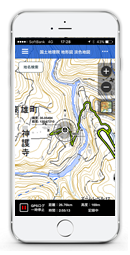
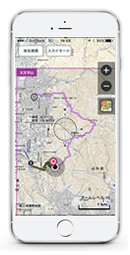
京都の山々は新緑が映える美しい季節を迎えております。夏を感じる日差しの中、京都市の北西部に位置する嵐山高雄パークウェイに気分転換にドライブに行ってきました。移動中SkyWalkingでGPSログを取得し、地図で現在位置を確認するなど、登山・防災用GPSオフラインマップアプリとしての機能を備えるSkyWalkingの使い方を、スクリーンショットも交えて解説していますので、ぜひご覧ください。
</p>

<a href="https://itunes.apple.com/jp/app/skywalking/id1090323263?mt=8&ign-mpt=uo%3D4" target="itunes_store">
<img style="margin: 20px 20px 20px 0px; border: 0px;" src="/img/App_Store_Badge_JP_135x40.png" />
</a>

</div>

<p>
→ 詳細は、ヤマレコのページ<a href="http://www.yamareco.com/modules/yamareco/detail-871387.html">「新緑の嵐山高雄パークウェイと神護寺の青もみじ」</a>をご覧ください。
</p>]]>
<![CDATA[<?php
	if ((preg_match("/iPhone/", $_SERVER['HTTP_USER_AGENT'])) || (preg_match("/iPod/", $_SERVER['HTTP_USER_AGENT']))) {
		////////////////////////////to iPhone / iPod
		echo '

<img src="http://yamareco.info/modules/yamareco/upimg/87/871387/900f4e51c30c79747ecd38936bbcfbe9.PNG" style="margin-bottom: 10px; border: 1px solid #BBB;" width="240" height="427" />
<img src="http://yamareco.info/modules/yamareco/upimg/87/871387/dede35eca89f4833f8104afb07ca9dcf.PNG" style="margin-bottom: 10px; border: 1px solid #BBB;" width="240" height="426" />
<img src="http://yamareco.info/modules/yamareco/upimg/87/871387/e593307216fac9ff4bfe572e6a5cc50d.PNG" style="margin-bottom: 10px; border: 1px solid #BBB;" width="240" height="426" />
<img src="http://yamareco.info/modules/yamareco/upimg/87/871387/d7d379114c1db32ea26d5b7643ee7056.PNG" style="margin-bottom: 10px; border: 1px solid #BBB;" width="240" height="426" />
<img src="http://yamareco.info/modules/yamareco/upimg/87/871387/0993085e0e12a300904bdb9826a6cec5.PNG" style="margin-bottom: 10px; border: 1px solid #BBB;" width="240" height="426" />

<p>
移動中の位置情報を記録するGPSログの取得には、登山・防災用GPSオフラインマップアプリ「SkyWalking」を使いました。車での移動中も、山中の徒歩での移動中も、正確にGPSログを取得しながら、iPhoneの画面に表示された国土地理院の地形図をベースとしたオフラインマップ上に、現在位置や標高などの位置情報が表示されるので、自分の位置を正確に知ることができます。
</p>

<p>
続きはヤマレコページをご覧ください。<a href="http://www.yamareco.com/modules/yamareco/detail-871387.html">「新緑の嵐山高雄パークウェイと神護寺の青もみじ（iOSアプリSkyWalkingでGPSログ取得）」</a>
</p>

<p>
<a href="https://itunes.apple.com/jp/app/skywalking/id1090323263?mt=8&ign-mpt=uo%3D4" target="itunes_store">このアプリをiTunes Storeでチェック</a>
</p>

<p>
→ 詳細は、<a href="/skywalking/">SkyWalking オフィシャルサイト</a><br />
→ <a href="https://twitter.com/skywalkingapp">SkyWalking Twitter</a><br />
→ <a href="https://www.facebook.com/skywalkingapp/?pnref=story">SkyWalking FaceBook</a>
→ <a href="http://www.yamareco.com/modules/yamareco/userinfo-42609-data.html">管理人のヤマレコ</a>
</p>

		';
	} else {
		////////////////////////////to PC
		echo '
<p class="tensen"></p>

<div style="both: clear;">
	<div style="margin: 0px 0px 10px 0px; float: left;">
<img src="http://yamareco.info/modules/yamareco/upimg/87/871387/900f4e51c30c79747ecd38936bbcfbe9.PNG" style="margin-right: 30px;" width="240" height="426" />
<img src="http://yamareco.info/modules/yamareco/upimg/87/871387/dede35eca89f4833f8104afb07ca9dcf.PNG" style="margin-right: 0px;" width="240" height="426" />
	</div>
</div>

<div style="both: clear;">
	<div style="margin: 0px 0px 10px 0px; float: left;">
<img src="http://yamareco.info/modules/yamareco/upimg/87/871387/e593307216fac9ff4bfe572e6a5cc50d.PNG" style="margin-right: 30px;" width="240" height="426" />
<img src="http://yamareco.info/modules/yamareco/upimg/87/871387/d7d379114c1db32ea26d5b7643ee7056.PNG" style="margin-right: 0px;" width="240" height="426" />
	</div>
</div>

<div style="both: clear;">
	<div style="margin: 0px 0px 10px 0px; float: left;">
<img src="http://yamareco.info/modules/yamareco/upimg/87/871387/0993085e0e12a300904bdb9826a6cec5.PNG" style="margin-right: 30px;" width="240" height="426" />
	</div>
</div>

<p>
移動中の位置情報を記録するGPSログの取得には、登山・防災用GPSオフラインマップアプリ「SkyWalking」を使いました。車での移動中も、山中の徒歩での移動中も、正確にGPSログを取得しながら、iPhoneの画面に表示された国土地理院の地形図をベースとしたオフラインマップ上に、現在位置や標高などの位置情報が表示されるので、自分の位置を正確に知ることができます。
</p>

<p>
続きはヤマレコページをご覧ください。<a href="http://www.yamareco.com/modules/yamareco/detail-871387.html">「新緑の嵐山高雄パークウェイと神護寺の青もみじ（iOSアプリSkyWalkingでGPSログ取得）」</a>
</p>
<p class="posted"></p>

<div class="image_button">
	<ul>
		<li class="btn1">
			<a href="https://itunes.apple.com/jp/app/skywalking/id1090323263?mt=8&ign-mpt=uo%3D4" target="itunes_store">
				このアプリをiTunes Storeでチェック
			</a>
		</li>
	</ul>
</div>
<p class="posted"></p>

<p>
→ 詳細は、<a href="/skywalking/">SkyWalking オフィシャルサイト</a><br />
→ <a href="https://twitter.com/skywalkingapp">SkyWalking Twitter</a><br />
→ <a href="https://www.facebook.com/skywalkingapp/?pnref=story">SkyWalking FaceBook</a>
→ <a href="http://www.yamareco.com/modules/yamareco/userinfo-42609-data.html">管理人のヤマレコ</a>
</p>


		';
	}
?>]]>
</content>
</entry>

<entry>
<title>ヤマレコにSkyWalkingを使用したGPSログ取得フィールドテストの模様をアップしました</title>
<link rel="alternate" type="text/html" href="https://deepkick.com/archives/1000news/skywalkinggps.html" />
<modified>2016-05-14T17:15:12Z</modified>
<issued>2016-03-29T05:33:41Z</issued>
<id>tag:deepkick.com,2016://18.2580</id>
<created>2016-03-29T05:33:41Z</created>
<summary type="text/plain">ヤマレコにSkyWalkingを使用したGPSログ取得のフィールドテストの模様をアップしました。「蹴上から大文字山・如意ヶ岳へ（SkyWalking 次期バージョンのフィールドテスト）」</summary>
<author>
<name>kaoru</name>
<url>https://deepkick.com/</url>
<email>kaoru@deepkick.com</email>
</author>
<dc:subject>1000News</dc:subject>
<content type="text/html" mode="escaped" xml:lang="ja" xml:base="https://deepkick.com/">
<![CDATA[<a href="https://itunes.apple.com/jp/app/skywalking/id1090323263?mt=8&ign-mpt=uo%3D4" target="itunes_store">
<img alt="登山・防災用GPSオフラインマップ・SkyWalking" src="https://deepkick.com/skywalking/img/skywalking_thumbnail_002.png" style="border: 0px;" />
</a>
<div class="portBox">
<p>
登山SNSサイトのヤマレコに登山・防災用GPSオフラインマップアプリ・SkyWalkingを使用したGPSログ取得のフィールドテストの模様をアップしました。
</p>

<p>
SkyWalkingの次期バージョンのフィールドテストを兼ねまして、京都の東山、五山の送り火で有名な大文字山へ登ってきました。実際にどういった使い方ができるのスクリーンショットも交えて解説していますので、ぜひご覧ください
</p>

<a href="https://itunes.apple.com/jp/app/skywalking/id1090323263?mt=8&ign-mpt=uo%3D4" target="itunes_store">
<img style="margin: 20px 20px 20px 0px; border: 0px;" src="/img/App_Store_Badge_JP_135x40.png" />
</a>

</div>

<p>
→ 詳細は、ヤマレコのページ<a href="http://www.yamareco.com/modules/yamareco/detail-837150.html">「蹴上から大文字山・如意ヶ岳へ（SkyWalking 次期バージョンのフィールドテスト）」</a>をご覧ください。
</p>]]>
<![CDATA[<?php
	if ((preg_match("/iPhone/", $_SERVER['HTTP_USER_AGENT'])) || (preg_match("/iPod/", $_SERVER['HTTP_USER_AGENT']))) {
		////////////////////////////to iPhone / iPod
		echo '

<img src="http://yamareco.info/modules/yamareco/upimg/83/837150/be1047cc927d77ae3ce3f7373aab9dc2.PNG" style="margin-bottom: 10px; border: 1px solid #BBB;" width="240" height="427" />
<img src="http://yamareco.info/modules/yamareco/upimg/83/837150/348f2a75faff86cfadecf6a2a0f22099.PNG" style="margin-bottom: 10px; border: 1px solid #BBB;" width="240" height="426" />
<img src="http://yamareco.info/modules/yamareco/upimg/83/837150/c79bf38cf6218454604e15b9f35902e3.PNG" style="margin-bottom: 10px; border: 1px solid #BBB;" width="240" height="426" />
<img src="http://yamareco.info/modules/yamareco/upimg/83/837150/45815206647c7f7019e12c2e9e9231ea.PNG" style="margin-bottom: 10px; border: 1px solid #BBB;" width="240" height="426" />
<img src="http://yamareco.info/modules/yamareco/upimg/83/837150/c6553911ebfd0ff593316e64e5fbef14.PNG" style="margin-bottom: 10px; border: 1px solid #BBB;" width="240" height="426" />
<img src="http://yamareco.info/modules/yamareco/upimg/83/837150/60c60b5b5dbb0b2674e0999c4f99ae52.PNG" style="margin-bottom: 10px; border: 1px solid #BBB;" width="240" height="426" />

<p>
さて、SkyWalkingの次期バージョンのフィールドテストを兼ねまして、京都の東山、五山の送り火で有名な大文字山へ行ってきました。<br />
アプリ開発の手を休めて、午後の遅い時間、14:20に蹴上駅に到着。SkyWalkingを立ち上げ、あらかじめ用意していた大文字山周辺のオフライン用地図データを選択し、ネットに接続できない環境でも地図が表示できるようにセット。そしてGPSログのレコーディングをスタート。山中で実際にSkyWalkingでGPSログを取得しながらテストし、問題なく機能できるかどうかをチェックしていきます。<br />
</p>

<p>
続きはヤマレコページをご覧ください。<a href="http://www.yamareco.com/modules/yamareco/detail-837150.html">「蹴上から大文字山・如意ヶ岳へ（SkyWalking 次期バージョンのフィールドテスト）」</a>
</p>

<p>
<a href="https://itunes.apple.com/jp/app/skywalking/id1090323263?mt=8&ign-mpt=uo%3D4" target="itunes_store">このアプリをiTunes Storeでチェック</a>
</p>

<p>
→ 詳細は、<a href="/skywalking/">SkyWalking オフィシャルサイト</a><br />
→ <a href="https://twitter.com/skywalkingapp">SkyWalking Twitter</a><br />
→ <a href="https://www.facebook.com/skywalkingapp/?pnref=story">SkyWalking FaceBook</a>
→ <a href="http://www.yamareco.com/modules/yamareco/userinfo-42609-data.html">管理人のヤマレコ</a>
</p>

		';
	} else {
		////////////////////////////to PC
		echo '
<p class="tensen"></p>

<div style="both: clear;">
	<div style="margin: 0px 0px 10px 0px; float: left;">
<img src="http://yamareco.info/modules/yamareco/upimg/83/837150/be1047cc927d77ae3ce3f7373aab9dc2.PNG" style="margin-right: 30px;" width="240" height="426" />
<img src="http://yamareco.info/modules/yamareco/upimg/83/837150/348f2a75faff86cfadecf6a2a0f22099.PNG" style="margin-right: 0px;" width="240" height="426" />
	</div>
</div>

<div style="both: clear;">
	<div style="margin: 0px 0px 10px 0px; float: left;">
<img src="http://yamareco.info/modules/yamareco/upimg/83/837150/c79bf38cf6218454604e15b9f35902e3.PNG" style="margin-right: 30px;" width="240" height="426" />
<img src="http://yamareco.info/modules/yamareco/upimg/83/837150/45815206647c7f7019e12c2e9e9231ea.PNG" style="margin-right: 0px;" width="240" height="426" />
	</div>
</div>

<div style="both: clear;">
	<div style="margin: 0px 0px 10px 0px; float: left;">
<img src="http://yamareco.info/modules/yamareco/upimg/83/837150/c6553911ebfd0ff593316e64e5fbef14.PNG" style="margin-right: 30px;" width="240" height="426" />
<img src="http://yamareco.info/modules/yamareco/upimg/83/837150/60c60b5b5dbb0b2674e0999c4f99ae52.PNG" style="margin-right: 0px;" width="240" height="426" />
	</div>
</div>

<p>
さて、SkyWalkingの次期バージョンのフィールドテストを兼ねまして、京都の東山、五山の送り火で有名な大文字山へ行ってきました。<br />
アプリ開発の手を休めて、午後の遅い時間、14:20に蹴上駅に到着。SkyWalkingを立ち上げ、あらかじめ用意していた大文字山周辺のオフライン用地図データを選択し、ネットに接続できない環境でも地図が表示できるようにセット。そしてGPSログのレコーディングをスタート。山中で実際にSkyWalkingでGPSログを取得しながらテストし、問題なく機能できるかどうかをチェックしていきます。<br />
</p>

<p>
続きはヤマレコページをご覧ください。<a href="http://www.yamareco.com/modules/yamareco/detail-837150.html">「蹴上から大文字山・如意ヶ岳へ（SkyWalking 次期バージョンのフィールドテスト）」</a>
</p>
<p class="posted"></p>

<div class="image_button">
	<ul>
		<li class="btn1">
			<a href="https://itunes.apple.com/jp/app/skywalking/id1090323263?mt=8&ign-mpt=uo%3D4" target="itunes_store">
				このアプリをiTunes Storeでチェック
			</a>
		</li>
	</ul>
</div>
<p class="posted"></p>

<p>
→ 詳細は、<a href="/skywalking/">SkyWalking オフィシャルサイト</a><br />
→ <a href="https://twitter.com/skywalkingapp">SkyWalking Twitter</a><br />
→ <a href="https://www.facebook.com/skywalkingapp/?pnref=story">SkyWalking FaceBook</a>
→ <a href="http://www.yamareco.com/modules/yamareco/userinfo-42609-data.html">管理人のヤマレコ</a>
</p>


		';
	}
?>]]>
</content>
</entry>

<entry>
<title>登山・防災用GPSオフラインマップアプリ：SkyWalking リリース！</title>
<link rel="alternate" type="text/html" href="https://deepkick.com/archives/1000news/gpsskywalking.html" />
<modified>2016-05-13T01:30:11Z</modified>
<issued>2016-03-26T02:04:13Z</issued>
<id>tag:deepkick.com,2016://18.2577</id>
<created>2016-03-26T02:04:13Z</created>
<summary type="text/plain">シンプルで直感的な操作で使える登山・防災用GPSオフラインマップアプリ SkyWalking。登山やトレイルランニングなど、ネットに接続できない山岳エリアでも、事前にオフライン用地図データを作成しておけば、ネットワーク接続を気にせずに現在地や標高、方角、行動ルート、目的地を地図上に表示することができます。</summary>
<author>
<name>kaoru</name>
<url>https://deepkick.com/</url>
<email>kaoru@deepkick.com</email>
</author>
<dc:subject>1000News</dc:subject>
<content type="text/html" mode="escaped" xml:lang="ja" xml:base="https://deepkick.com/">
<![CDATA[<a href="https://itunes.apple.com/jp/app/skywalking/id1090323263?mt=8&ign-mpt=uo%3D4" target="itunes_store">
<img alt="登山・防災用GPSオフラインマップ・SkyWalking" src="https://deepkick.com/skywalking/img/skywalking_thumbnail.png" style="border: 0px;" />
</a>
<div class="portBox">
<ul class="portfolio1">
<li class="portfolio2">アプリの企画・設計</li>
<li class="portfolio2">デザイン</li>
<li class="portfolio2">Universal 対応（iPad対応）</li>
<li class="portfolio2">国土地理院地図タイルの利用</li>
<li class="portfolio2">Objective-Cプログラミング（Xcode）</li>
<li class="portfolio2">アプリ内課金</li>
<li class="portfolio2">アプリの登録・管理全般</li>
</ul>

<a href="https://itunes.apple.com/jp/app/skywalking/id1090323263?mt=8&ign-mpt=uo%3D4" target="itunes_store">
<img style="margin: 20px 20px 20px 0px; border: 0px;" src="/img/App_Store_Badge_JP_135x40.png" />
</a>

</div>

<p class="tensen"></p>

<p>
シンプルで直感的な操作で使える高機能登山・防災用GPSオフラインマップiOSアプリ SkyWalkingを開発・App Storeにて公開しています。<br />
</p>

<p>
SkyWalkingは、登山やトレイルランニングなど、ネットに接続できない山岳エリアでも、事前にオフライン用地図データを作成しておけば、ネットワーク接続を気にせずに現在地や標高、方角、行動ルート、目的地を地図上に表示することができます。<br />
</p>
<p>
ベースとなる地図上にさまざまな地理情報が付加された地図をオーバーレイ表示することで、様々な地図データを新たな視点でビジュアル化することができます。たとえば、1950年代の空撮画像をオーバーレイすることで、以前の様子を鳥になった気分で俯瞰し現在の地図と比較したり、噴火や災害発生時に撮影された空撮画像をオーバーレイすることで、地殻変動を防災に関する知識を高めるといった使い方ができます。<br />
</p>
<p>
SkyWalkingのGPSログ記録機能を使ってあなたの行動をGPSログとして取得し、リアルタイムで地図上に表示。現在位置や高度、方位、目的地までのルートを確認することができます。またGPX形式にエクスポートしてヤマレコなど他のサービスにアップロードしてルート情報を共有したり、他の人のGPXをSkyWalkingにインポートして地図上に表示し、参考ルートにするといった使い方ができます。登山における遭難や道迷いの防止に役立ちます。<br />
</p>
<p>
最新のiOS9から使えるようになったFlyOver表示にも対応。東京やニューヨークといった大都市や、ヨーロッパ・アルプスあるいはヨセミテ国立公園といった名所をスカイモードで俯瞰してみてください。まるで鳥になったような臨場感が楽しめます。<br />
</p>
<p>
無料版のSkyWalkingをあなたのiPhoneにインストールして、登山やトレイルランニング、外岩でのクライミングやボルダリング、サイクリングなどのアウトドア活動、ドライブ、地形の調査や学習などに使ってみてください。<br />
</p>
<p>
→ 詳細は、<a href="/skywalking/">SkyWalking オフィシャルサイト</a><br />
→ <a href="https://twitter.com/skywalkingapp">SkyWalking Twitter</a><br />
→ <a href="https://www.facebook.com/skywalkingapp/?pnref=story">SkyWalking FaceBook</a>
</p>]]>
<![CDATA[<?php
	if ((preg_match("/iPhone/", $_SERVER['HTTP_USER_AGENT'])) || (preg_match("/iPod/", $_SERVER['HTTP_USER_AGENT']))) {
		////////////////////////////to iPhone / iPod
		echo '

<img src="/skywalking/img/skyWalking_02_01.png" style="margin-bottom: 10px; border: 1px solid #BBB;" width="240" height="426" />
<img src="/skywalking/img/skyWalking_02_02.png" style="margin-bottom: 10px; border: 1px solid #BBB;" width="240" height="426" />
<img src="/skywalking/img/skyWalking_02_03.png" style="margin-bottom: 10px; border: 1px solid #BBB;" width="240" height="426" />
<img src="/skywalking/img/skyWalking_02_04.png" style="margin-bottom: 10px; border: 1px solid #BBB;" width="240" height="426" />
<img src="/skywalking/img/skyWalking_02_05.png" style="margin-bottom: 10px; border: 1px solid #BBB;" width="240" height="426" />
<img src="/skywalking/img/skyWalking_02_06.png" style="margin-bottom: 10px; border: 1px solid #BBB;" width="240" height="426" />

<p>
<strong>SkyWalking が想定しているユーザーと使い方</strong><br />
・アウトドア活動におけるルート、現在位置、高度、方位の確認に。<br />
　　登山。ハイキング。トレッキング。キャンプ。外岩クライミング。ボルダリング。トレイルランニング。サイクリング。ドライブ。ランニング。マラソン。パラグライダー。釣り。野天湯・秘湯めぐり etc。<br />
・ヤマレコなどのGPSルート共有サイトにルート情報をアップしたい方。<br />
・GPXファイルをダウンロードして地図上にルートを表示したい方。<br />
・ネットに接続できない環境（山岳地帯など）でも、あらかじめ作成したオフライン地図で現在位置や標高などの位置情報を確認したい方。<br />
・GPSログを取得し、保存・地図上に表示・外部サービスで共有したい方。<br />
・自分の現在位置や行動記録（GPSログ）を取得したい旅行者。街歩き。お店めぐり。名所めぐり。写真撮影など、行動を記録したい方。<br />
・事前にGPXルートを地図上に表示して、登山やランニングの予定ルートの作成や、旅行などの計画づくりに生かしたい方。<br />
・高詳細な3Dビューマップや地形図を眺めるのが好きな方。<br />
・災害被災地や噴火活動など、地形の変化を地図上でオーバーレイ表示したい方。防災・地質の研究や学習に。<br />
・GPSランニングアート。<br />
・位置情報や高度、ルートを地図上でビジュアライズしたい方。
</p>

<p>
<strong>SkyWalkingの主な特徴</strong><br />
・国土地理院の地図タイル画像を利用した任意のエリアのオフライン地図の作成（日本国内のみ）<br />
・一度表示した地図タイル画像をアプリ内部に自動的にキャッシュし、オフライン時に再利用する機能<br />
・作成したオフライン地図のエリアを複数表示する機能<br />
・地図の3Dビュー表示<br />
・AppleMapのFlyOver（3Dビュー）表示対応<br />
・OpenStreetMapの表示対応<br />
・国土地理院が配信する日本国内の地形図（縮尺：1/2500, 1/25000）の表示<br />
・国土地理院が配信する以下の災害被災地や噴火活動などの地殻変動を時間別に空撮した40種類以上のオルソ画像のオーバーレイ表示<br />
・任意の地点をお気に入り地点としてブックマークする機能<br />
・現在位置の緯度経度・標高・方位をリアルタイム表示<br />
・ヤマレコなどGPXファイルをダウンロードできるサイトからGPXをインポートする機能<br />
・GPXの地図表示<br />
・取得したGPSログをGPXファイルに変換し、外部にエクスポート<br />
・GPSログ取得の詳細なパラメーターの制御（ActivityType, GPS accuracy, Distance Filter の制御）<br />
・取得中のGPSログの移動距離・時間・標高などの位置情報をリアルタイム表示<br />
・取得中のGPSログを地図上にリアルタイム表示<br />
・取得したGPSログおよびGPXデータの距離・時間・標高データを視覚化した高度グラフの表示<br />
・取得中のGPSログ、保存したGPSログ、GPXの複数表示<br />
・素早く目的地を表示する地名検索機能<br />
・緯度経度グリッド表示<br />
・磁北線表示（日本国内のみ）<br />
</p>

<p>
<strong>SkyWalkingの対応機種</strong><br />
iOS9.0以上をインストールしているiPhone。推奨機種は、iPhone5以上です。<br />
GPSが搭載されていないWi-Fiモデルでも使用可能ですが、ユーザーの位置情報取得にGPSをフルに活用するため、GPS機能が搭載されているデバイスがオススメです。<br />
</p>

<p>
<a href="https://itunes.apple.com/jp/app/skywalking/id1090323263?mt=8&ign-mpt=uo%3D4" target="itunes_store">このアプリをiTunes Storeでチェック</a>
</p>

		';
	} else {
		////////////////////////////to PC
		echo '
<p class="tensen"></p>

<div style="margin: 20px auto 20px;">
<iframe width="480" height="360" src="https://www.youtube.com/embed/nZkjpnOoDGQ" frameborder="0" allowfullscreen></iframe>
</div>
<p class="tensen"></p>


<div style="both: clear;">
	<div style="margin: 0px 0px 10px 0px; float: left;">
<img src="/skywalking/img/skyWalking_02_01.png" style="margin-right: 30px;" width="240" height="426" />
<img src="/skywalking/img/skyWalking_02_02.png" style="margin-right: 0px;" width="240" height="426" />
	</div>
</div>

<div style="both: clear;">
	<div style="margin: 0px 0px 10px 0px; float: left;">
<img src="/skywalking/img/skyWalking_02_03.png" style="margin-right: 30px;" width="240" height="426" />
<img src="/skywalking/img/skyWalking_02_04.png" style="margin-right: 0px;" width="240" height="426" />
	</div>
</div>

<div style="both: clear;">
	<div style="margin: 0px 0px 10px 0px; float: left;">
<img src="/skywalking/img/skyWalking_02_05.png" style="margin-right: 30px;" width="240" height="426" />
<img src="/skywalking/img/skyWalking_02_06.png" style="margin-right: 0px;" width="240" height="426" />
	</div>
</div>

<p>
<strong>SkyWalking が想定しているユーザーと使い方</strong><br />
</p>
<p>・アウトドア活動におけるルート、現在位置、高度、方位の確認に。<br />
　　登山。ハイキング。トレッキング。キャンプ。外岩クライミング。ボルダリング。トレイルランニング。サイクリング。ドライブ。ランニング。マラソン。パラグライダー。釣り。野天湯・秘湯めぐり etc。<br />
</p>

<p>・ヤマレコなどのGPSルート共有サイトにルート情報をアップしたい方。</p>
<p>・GPXファイルをダウンロードして地図上にルートを表示したい方。</p>
<p>・ネットに接続できない環境（山岳地帯など）でも、あらかじめ作成したオフライン地図で現在位置や標高などの位置情報を確認したい方。</p>
<p>・GPSログを取得し、保存・地図上に表示・外部サービスで共有したい方。</p>
<p>・自分の現在位置や行動記録（GPSログ）を取得したい旅行者。街歩き。お店めぐり。名所めぐり。写真撮影など、行動を記録したい方。</p>
<p>・事前にGPXルートを地図上に表示して、登山やランニングの予定ルートの作成や、旅行などの計画づくりに生かしたい方。</p>
<p>・高詳細な3Dビューマップや地形図を眺めるのが好きな方。</p>
<p>・災害被災地や噴火活動など、地形の変化を地図上でオーバーレイ表示したい方。防災・地質の研究や学習に。</p>
<p>・GPSランニングアート。</p>
<p>・位置情報や高度、ルートを地図上でビジュアライズしたい方。</p>
<p class="posted"></p>

<p>
<strong>SkyWalkingの主な特徴</strong><br />
</p>
<p>・国土地理院の地図タイル画像を利用した任意のエリアのオフライン地図の作成（日本国内のみ）</p>
<p>・一度表示した地図タイル画像をアプリ内部に自動的にキャッシュし、オフライン時に再利用する機能</p>
<p>・作成したオフライン地図のエリアを複数表示する機能</p>
<p>・地図の3Dビュー表示</p>
<p>・AppleMapのFlyOver（3Dビュー）表示対応</p>
<p>・OpenStreetMapの表示対応</p>
<p>・国土地理院が配信する日本国内の地形図（縮尺：1/2500, 1/25000）の表示</p>
<p>・国土地理院が配信する以下の災害被災地や噴火活動などの地殻変動を時間別に空撮した40種類以上のオルソ画像のオーバーレイ表示</p>
<p>・任意の地点をお気に入り地点としてブックマークする機能</p>
<p>・現在位置の緯度経度・標高・方位をリアルタイム表示</p>
<p>・ヤマレコなどGPXファイルをダウンロードできるサイトからGPXをインポートする機能</p>
<p>・GPXの地図表示</p>
<p>・取得したGPSログをGPXファイルに変換し、外部にエクスポート</p>
<p>・GPSログ取得の詳細なパラメーターの制御（ActivityType, GPS accuracy, Distance Filter の制御）</p>
<p>・取得中のGPSログの移動距離・時間・標高などの位置情報をリアルタイム表示</p>
<p>・取得中のGPSログを地図上にリアルタイム表示</p>
<p>・取得したGPSログおよびGPXデータの距離・時間・標高データを視覚化した高度グラフの表示</p>
<p>・取得中のGPSログ、保存したGPSログ、GPXの複数表示</p>
<p>・素早く目的地を表示する地名検索機能</p>
<p>・緯度経度グリッド表示</p>
<p>・磁北線表示（日本国内のみ）</p>
<p class="posted"></p>

<p>
<strong>SkyWalkingの対応機種</strong><br />
</p>
<p>iOS9.0以上をインストールしているiPhone。推奨機種は、iPhone5以上です。</p>
<p>GPSが搭載されていないWi-Fiモデルでも使用可能ですが、ユーザーの位置情報取得にGPSをフルに活用するため、GPS機能が搭載されているデバイスがオススメです。</p>
</p>
<p class="posted"></p>

<div class="image_button">
	<ul>
		<li class="btn1">
			<a href="https://itunes.apple.com/jp/app/skywalking/id1090323263?mt=8&ign-mpt=uo%3D4" target="itunes_store">
				このアプリをiTunes Storeでチェック
			</a>
		</li>
	</ul>
</div>


		';
	}
?>]]>
</content>
</entry>

<entry>
<title>「Papervision3Dではじめる Flash 3Dアニメーション」発売！</title>
<link rel="alternate" type="text/html" href="https://deepkick.com/archives/1000news/papervision3d_f.html" />
<modified>2009-08-05T03:49:34Z</modified>
<issued>2009-07-10T04:33:56Z</issued>
<id>tag:deepkick.com,2009://18.2215</id>
<created>2009-07-10T04:33:56Z</created>
<summary type="text/plain">ハヤシカオルの７冊目の書籍となる「Papervision3Dではじめる Flash 3Dアニメーション」を出版しました。Flash 3DやPapervision3Dを使ったインタラクティブコンテンツに興味のある方を対象としています。</summary>
<author>
<name>kaoru</name>
<url>https://deepkick.com/</url>
<email>kaoru@deepkick.com</email>
</author>
<dc:subject>1000News</dc:subject>
<content type="text/html" mode="escaped" xml:lang="ja" xml:base="https://deepkick.com/">
<![CDATA[
<span class="mt-enclosure mt-enclosure-image" style="display: inline;">

<a href="http://www.amazon.co.jp/gp/product/4774139378?ie=UTF8&amp;tag=fudousanindex-22&amp;linkCode=as2&amp;camp=247&amp;creative=1211&amp;creativeASIN=4774139378">

<img alt="Papervision3Dではじめる Flash 3Dアニメーション" src="https://deepkick.com/img/Flash3DBook.jpg" width="130" height="165" class="mt-image-none" style="" />

</a>

</span>

<div class="portBox">
<h3>Papervision3Dではじめる Flash 3Dアニメーション</h3>
<ul class="portfolio1">
<li class="portfolio2">書籍執筆</li>
</ul>
</div>

<div style="both:clear;">

<p class="posted"></p>

<h3>書籍データ</h3>

<dl id="book">
<dt>書名</dt>
<dd>Papervision3Dではじめる Flash 3Dアニメーション</dd>
<dt>著者</dt>
<dd><a href="/archives/1100about/post_2.html">ハヤシカオル</a></dd>
<dt>出版社</dt>
<dd><a class="external" href="http://gihyo.jp/">技術評論社</a></dd>
<dt>出版年月</dt>
<dd>2009年7月31日</dd>

<dt>判型</dt>
<dd>B5変形判</dd>
<dt>ページ数</dt>
<dd>376ページ</dd>
<dt>ISBN</dt>
<dd>ISBN 978-4774139371</dd>
<dt>価格</dt>
<dd>3,780円（税込）</dd>
</dl>
</div>

<p>
<a href="http://www.amazon.co.jp/gp/product/4774139378?ie=UTF8&amp;tag=fudousanindex-22&amp;linkCode=as2&amp;camp=247&amp;creative=1211&amp;creativeASIN=4774139378">

本書の購入ができます。（amazon.co.jp）

</a>

<img src="http://www.assoc-amazon.jp/e/ir?t=fudousanindex-22&amp;l=as2&amp;o=9&amp;a=4774139378" width="1" height="1" alt="" style="border:none !important; margin:0px !important;" />
</p>

<p class="posted"></p>

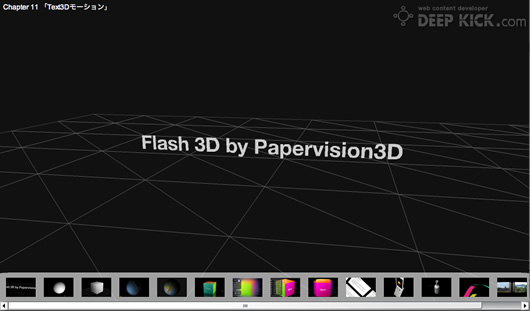
<h3>本書で解説・制作する3Dアニメーションサンプル</h3>


<span class="mt-enclosure mt-enclosure-image" style="display: inline;"><a href="https://deepkick.com/papervision3D_book/composite/index.swf"><img alt="pv3d_samples.jpg" src="https://deepkick.com/img/pv3d_samples.jpg" width="530" height="311" class="mt-image-none" style="" /></a></span>

<p>
本書で解説する3Dアニメーションのサンプルは<a href="https://deepkick.com/papervision3D_book/composite/index.swf">こちら</a>をご覧ください。（要Flash Player 10）
</p>

<p class="posted"></p>

<p>
ハヤシカオルの７冊目の書籍となる<strong>「Papervision3Dではじめる Flash 3Dアニメーション」</strong>が完成しました。書店にて発売中です。<br />
本書は、ActionScript 3.0の基本的なことを習得されている方で、Papervision3D 2.0やFlash 3Dに興味はあるが初めてであったり、よく分からないといった方を対象とした書籍です。サンプルはすべてFlash Player 10対応、ActionScript 3.0ベースです。<br />
60を超える豊富なサンプルデータを<a href="http://gihyo.jp/book/2009/978-4-7741-3937-1">サポートサイト</a>からダウンロードすることができ、Flash CS4 をお持ちでない方も無料でダウンロードできるFlex 3.3 SDKをインストール済みの環境であれば、本書のサンプルを開いてコンパイルすることができます。つまりFlashをお持ちでない方も無料で構築できる環境で学習を進めていけるように配慮しています。<br />
ここでは簡単に、目次と本書で制作するサンプルの一部をご紹介します。サンプルは下のリンクをクリックしてください。このような感じのPapervision3Dのサンプルを本書では作成していきます。多くのサンプルが画面をドラッグするなどして、オブジェクトを3D空間内で回転させることができますので、実際に試してみてください。
</p>

<p>
本書の目次は、続きをお読みください。
</p>]]>
<![CDATA[<h3>Papervision3Dではじめる Flash 3Dアニメーション：目次</h3>
<h4 class="bookindex">準備編</h4>
<ul class="contentList">
	<li class="contentList">Chapter 1　<strong>Papervision3Dとは</strong><br />
		<ul class="contentList2">
			<li class="contentList2">01-01 Flash 3Dの世界</li>
			<li class="contentList2">01-02 Flash 3Dライブラリ</li>
			<li class="contentList2">01-03 Papervision3Dの特徴とバージョン</li>
			<li class="contentList2">01-04 本書の目的</li>
			<li class="contentList2">01-05 本書で使用している環境</li>
		</ul>
	</li>
	<li class="contentList">Chapter 2　<strong>Papervision3Dのインストール</strong><br />
		<ul class="contentList2">
			<li class="contentList2">02-01 Subversionクライアントのインストール<br />
				<ul class="contentList2">
					<li class="contentList2">Mac OS X にsvnXをインストールする手順</li>
					<li class="contentList2">Windows にTortoiseSVNをインストールする手順</li>
				</ul>
			</li>
			<li class="contentList2">02-02 Subversionの使い方<br />
				<ul class="contentList2">
					<li class="contentList2">svnXの使い方</li>
					<li class="contentList2">TortoiseSVNの使い方</li>
				</ul>
			</li>
			<li class="contentList2">02-03 Papervision3Dのファイル構成</li>
			<li class="contentList2">02-04 Flashの環境設定</li>
		</ul>
	</li>
	<li class="contentList">Chapter 3　<strong>3D座標の基礎知識</strong><br />
		<ul class="contentList2">
			<li class="contentList2">03-01 2D座標空間</li>
			<li class="contentList2">03-02 左手座標系と右手座標系</li>
			<li class="contentList2">03-03 複数の座標空間</li>
			<li class="contentList2">03-04 基本軸周りの3D回転</li>
			<li class="contentList2">03-05 階層構造を持つ座標空間</li>
			<li class="contentList2">03-06 Papervision3Dの3D座標</li>
			<li class="contentList2">03-07 Flash Player 10の3D座標</li>
			<li class="contentList2">コラム Papervision3Dのオフィシャルサイト</li>
		</ul>
	</li>
	<li class="contentList">Chapter 4　<strong>ActionScript 3.0の基本</strong><br />
		<ul class="contentList2">
			<li class="contentList2">04-01 データ型</li>
			<li class="contentList2">04-02 クラスの設計と継承</li>
			<li class="contentList2">04-03 イベント処理の基本</li>
			<li class="contentList2">04-04 ループ処理</li>
			<li class="contentList2">04-05 ステージのリサイズイベント</li>
			<li class="contentList2">04-06 マウスイベント</li>
			<li class="contentList2">04-07 キーボードイベント</li>
			<li class="contentList2">04-08 階層構造を持つ座標空間の2Dサンプル</li>
		</ul>
	</li>
</ul>
<p class="posted"></p>

<h4 class="bookindex">基礎編</h4>
<ul class="contentList">
	<li class="contentList">Chapter 5　<strong>DisplayObject3Dオブジェクトの表示</strong><br />
		<ul class="contentList2">
			<li class="contentList2">05-01 3D空間とレンダリング</li>
			<li class="contentList2">05-02 マウスとカメラ位置の連動</li>
			<li class="contentList2">05-03 プリミティブオブジェクト<br />
				<ul class="contentList2">
					<li class="contentList2">a. Planeクラス</li>
					<li class="contentList2">b. Sphereクラス</li>
					<li class="contentList2">c. Cylinderクラス</li>
					<li class="contentList2">d. Coneクラス</li>
					<li class="contentList2">e. Cubeクラス</li>
				</ul>
			</li>
			<li class="contentList2">05-04 マテリアル<br />
				<ul class="contentList2">
					<li class="contentList2">a. WireframeMaterialクラス</li>
					<li class="contentList2">b. ColorMaterialクラス</li>
					<li class="contentList2">c. BitmapFileMaterialクラス</li>
					<li class="contentList2">d. BitmapAssetMaterialクラス</li>
					<li class="contentList2">e. MovieAssetMaterialクラス</li>
					<li class="contentList2">f. VideoStreamMaterialクラス</li>
					<li class="contentList2">g. MaterialsListクラス</li>
				</ul>
			</li>
			<li class="contentList2">05-05 カメラ<br />
				<ul class="contentList2">
					<li class="contentList2">a. ターゲットカメラ</li>
					<li class="contentList2">b. フリーカメラ</li>
					<li class="contentList2">c. デバッグカメラ</li>
					<li class="contentList2">d. 視錐台</li>
					<li class="contentList2">e. 視点と焦点距離</li>
					<li class="contentList2">f. 視野角</li>
					<li class="contentList2">g. ズーム機能</li>
					<li class="contentList2">h. ピクセル等倍</li>
					<li class="contentList2">i. zoom、focus、zの値を操作するサンプルの作成</li>
				</ul>
			</li>
			<li class="contentList2">05-06 基本形となるドキュメントクラス</li>
			<li class="contentList2">05-07 BasicViewクラス</li>
		</ul>
	</li>
	<li class="contentList">Chapter 6　<strong>インタラクティブに動かす</strong><br />
		<ul class="contentList2">
			<li class="contentList2">06-01 DisplayObject3Dオブジェクトの移動と回転<br />
				<ul class="contentList2">
					<li class="contentList2">a. DisplayObject3Dの直線運動</li>
					<li class="contentList2">b. DisplayObject3Dのプロパティ</li>
					<li class="contentList2">c. DisplayObject3Dのメソッド</li>
					<li class="contentList2">d. DisplayObject3Dの回転運動</li>
					<li class="contentList2">e. lookAt()メソッド</li>
				</ul>
			</li>
			<li class="contentList2">06-02 カメラの移動と回転<br />
				<ul class="contentList2">
					<li class="contentList2">a. カメラの直線運動</li>
					<li class="contentList2">b. カメラの回転運動</li>
					<li class="contentList2">c. カメラのオービット</li>
				</ul>
			</li>
			<li class="contentList2">06-03 複数のviewport</li>
			<li class="contentList2">06-04 DisplayObject3Dのイベント処理</li>
			<li class="contentList2">06-05 FileLoadEventクラス</li>
			<li class="contentList2">コラム Math.atan2()メソッドで角度を計算する</li>
		</ul>
	</li>
	<li class="contentList">Chapter 7　<strong>ライティングとシェーディング</strong><br />
		<ul class="contentList2">
			<li class="contentList2">07-01 PointLight3Dとshadematerials<br />
				<ul class="contentList2">
					<li class="contentList2">PointLight3Dクラス</li>
					<li class="contentList2">a. CellMaterialクラス</li>
					<li class="contentList2">b. FlatShadeMaterialクラス</li>
					<li class="contentList2">c. GouraudMaterialクラス</li>
					<li class="contentList2">d. PhongMaterialクラス</li>
				</ul>
			</li>
			<li class="contentList2">07-02 ShaderとShadedMaterial<br />
				<ul class="contentList2">
					<li class="contentList2">ShadedMaterialクラス</li>
					<li class="contentList2">a. CellShaderクラス</li>
					<li class="contentList2">b. FlatShaderクラス</li>
					<li class="contentList2">c. GouraudShaderクラス</li>
					<li class="contentList2">d. PhongShaderクラス</li>
					<li class="contentList2">e. EnvMapShaderクラス</li>
				</ul>

			</li>
			<li class="contentList2">07-03 ReflectionViewクラス</li>
		</ul>
	</li>
	<li class="contentList">Chapter 8　<strong>フィルターとエフェクト</strong><br />
		<ul class="contentList2">
			<li class="contentList2">08-01 ViewportLayerクラス</li>
			<li class="contentList2">08-02 フィルターの適用</li>
			<li class="contentList2">08-03 ColorTransformクラスの適用</li>
			<li class="contentList2">08-04 BitmapEffectLayerクラス</li>
		</ul>
	</li>
</ul>
<p class="posted"></p>

<h4 class="bookindex">応用編</h4>
<ul class="contentList">
	<li class="contentList">Chapter 9　<strong>Tweenerを使った3Dモーション</strong><br />
		<ul class="contentList2">
			<li class="contentList2">コラム マテリアルをタイル状にマッピングする</li>
		</ul>
	</li>
	<li class="contentList">Chapter 10　<strong>3Dモデリングデータの読み込み</strong>（Google SketchUp）<br />
		<ul class="contentList2">
			<li class="contentList2">コラム Mouse3Dでオブジェクト上のワールド座標を取得する</li>
		</ul>
	</li>
	<li class="contentList">Chapter 11　<strong>Text3Dモーション</strong></li>
	<li class="contentList">Chapter 12　<strong>Ribbon3Dモーション</strong></li>
	<li class="contentList">Chapter 13　<strong>3Dギャラリーの制作</strong></li>
	<li class="contentList">Appendix<br />
		<ul class="contentList2">
			<li class="contentList2">三角関数</li>
			<li class="contentList2">Flex SDKでの開発</li>
		</ul>
	</li>
</ul>]]>
</content>
</entry>

<entry>
<title>MacPeople 2009年02月号 記事執筆</title>
<link rel="alternate" type="text/html" href="https://deepkick.com/archives/1000news/macpeople_20090.html" />
<modified>2009-01-07T03:19:43Z</modified>
<issued>2009-01-07T03:17:00Z</issued>
<id>tag:deepkick.com,2009://18.2066</id>
<created>2009-01-07T03:17:00Z</created>
<summary type="text/plain">Mac情報マガジンのMacPeople 2009年02月号（株式会社アスキー・メディアワークス刊）の記事「まるかじり!! 注目デジ語大百科 - Flash」をハヤシカオルが執筆いたしました。</summary>
<author>
<name>kaoru</name>
<url>https://deepkick.com/</url>
<email>kaoru@deepkick.com</email>
</author>
<dc:subject>1000News</dc:subject>
<content type="text/html" mode="escaped" xml:lang="ja" xml:base="https://deepkick.com/">
<![CDATA[<p>

<a href="http://www.amazon.co.jp/gp/product/B001NYU0Q6?ie=UTF8&amp;tag=fudousanindex-22&amp;linkCode=as2&amp;camp=247&amp;creative=1211&amp;creativeASIN=B001NYU0Q6">

<img alt="macpeople 2009年02月号" src="https://deepkick.com/portfolio/img/macpeople200902-thumb-130x174.jpg" width="130" height="174" class="mt-image-none" style="" />

</a>

<img src="http://www.assoc-amazon.jp/e/ir?t=fudousanindex-22&amp;l=as2&amp;o=9&amp;a=B001NYU0Q6" width="1" height="1" alt="" style="border:none !important; margin:0px !important;" />

Mac情報マガジンの<strong>MacPeople 2009年02月号</strong>（株式会社アスキー・メディアワークス刊）の記事「まるかじり!! 注目デジ語大百科 - Flash」をハヤシカオルが執筆いたしました。
</p>

<p>
<a href="http://www.amazon.co.jp/gp/product/B001NYU0Q6?ie=UTF8&amp;tag=fudousanindex-22&amp;linkCode=as2&amp;camp=247&amp;creative=1211&amp;creativeASIN=B001NYU0Q6">
MacPeople 2009年02月号</a>
<img src="http://www.assoc-amazon.jp/e/ir?t=fudousanindex-22&amp;l=as2&amp;o=9&amp;a=B001NYU0Q6" width="1" height="1" alt="" style="border:none !important; margin:0px !important;" />
のp90?p91に掲載のモノクロ2ページの記事「まるかじり!! 注目デジ語大百科 - Flash」です。1995年以来Macとともに今日まで、仕事をしてきましたが、Mac専門誌への初めての執筆という記念すべき仕事になりました。Macファン、Appleファンとして嬉しいです。記事の内容は、Flashとは何か？について、Flashを触ったことがない人にも分かるように解説しています。
</p>]]>

</content>
</entry>

<entry>
<title>web creators - 連載「ActionScript 3 Technical Bible」</title>
<link rel="alternate" type="text/html" href="https://deepkick.com/archives/1000news/web_creators_ac.html" />
<modified>2008-12-31T07:38:31Z</modified>
<issued>2008-12-31T05:20:49Z</issued>
<id>tag:deepkick.com,2008://18.1970</id>
<created>2008-12-31T05:20:49Z</created>
<summary type="text/plain">MdNの月刊誌［web creators］の2008年09月号からスタートした連載「ActionScript 3 Technical Bible」をハヤシカオルが執筆しています。毎月web creators誌上にてActionScript3のテクニックを中心にFlashアプリケーションの制作過程を解説する４ページの連載です。</summary>
<author>
<name>kaoru</name>
<url>https://deepkick.com/</url>
<email>kaoru@deepkick.com</email>
</author>
<dc:subject>1000News</dc:subject>
<content type="text/html" mode="escaped" xml:lang="ja" xml:base="https://deepkick.com/">
<![CDATA[<p>

<a href="http://www.amazon.co.jp/gp/product/B001NLZ6OA?ie=UTF8&amp;tag=fudousanindex-22&amp;linkCode=as2&amp;camp=247&amp;creative=1211&amp;creativeASIN=B001NLZ6OA">

<span class="mt-enclosure mt-enclosure-image" style="display: inline;"><img alt="w86cover.jpg" src="https://deepkick.com/blog/img/w86cover.jpg" width="130" height="172" class="mt-image-none" style="" /></span>

</a>

<img src="http://www.assoc-amazon.jp/e/ir?t=fudousanindex-22&amp;l=as2&amp;o=9&amp;a=B001NLZ6OA" width="1" height="1" alt="" style="border:none !important; margin:0px !important;" />

MdNの月刊誌<strong>［web creators］</strong>の2008年09月号からスタートした連載<strong>「ActionScript 3 Technical Bible」</strong>をハヤシカオルが執筆しています。
</p>

<p>
<a href="http://www.amazon.co.jp/gp/product/B001NLZ6OA?ie=UTF8&amp;tag=fudousanindex-22&amp;linkCode=as2&amp;camp=247&amp;creative=1211&amp;creativeASIN=B001NLZ6OA">
web creators 2009年2月号</a>
<img src="http://www.assoc-amazon.jp/e/ir?t=fudousanindex-22&amp;l=as2&amp;o=9&amp;a=B001NLZ6OA" width="1" height="1" alt="" style="border:none !important; margin:0px !important;" />
に掲載の本連載のテーマは、「TweenMaxを使ったフォトギャラリー」です。本連載でもって、わたくしハヤシカオルの執筆はひとまず終了します。長いあいだご愛読いただき、ありがとうございました。
</p>

<p>

<span class="mt-enclosure mt-enclosure-image" style="display: inline;"><a href="https://deepkick.com/as3tb/v06/index.html"><img alt="deepphotogrid.jpg" src="https://deepkick.com/blog/img/deepphotogrid.jpg" width="130" height="93" class="mt-image-none" style="" /></a></span>

できあがりのサンプルは<a href="https://deepkick.com/as3tb/v06/index.html">こちら</a>からご覧いただけます。
</p>

<p>なお<a href="https://deepkick.com/blog/archives/actionscript3_t/">DEEP KICK.com Blog</a>にて、連載内容をご紹介しています。
</p>]]>
<![CDATA[<p>
［web creators］2008年08月号までおよそ２年半にわたって執筆させていただいた<a href="https://deepkick.com/blog/archives/flash_creative_tech/">「Flash Creative Technique」</a>に引き続き、本連載では、ActionScript1.0/2.0 で制作してきたクリエイターが、ActionScript3.0に移行するために理解しておきたい事柄について解説します。ActionScript3.0では、スクリプティング手法がオブジェクト指向に大きく方向転換しました。<br />
オブジェクト指向プログラミングの開発の特徴は、誰が見ても分かりやすい合理的な継承・上書きによるクラスベースのスクリプティング、他の人が制作し公開しているライブラリやクラスの再利用のしやすさにありますが、直感的なスクリプティングが可能だった ActionScript1.0/2.0との互換性は失われました。今後のFlashの進化とその方向性は、今後ActionScript3.0を基盤にしていくことは、歴然としています。そのあたりの事情をふまえて、ActionScript3での開発を目指すFlashクリエイターに有用なサンプル制作を解説していく連載内容にしていきたいと思いますので、ご期待ください。
</p>]]>
</content>
</entry>

<entry>
<title>ハヤシカオルの「ActionScript クリエイティブテクニック - Flash CS3/8対応版」発売！</title>
<link rel="alternate" type="text/html" href="https://deepkick.com/archives/1000news/actionscript_fl.html" />
<modified>2008-10-14T03:28:00Z</modified>
<issued>2008-10-13T07:45:19Z</issued>
<id>tag:deepkick.com,2008://18.2025</id>
<created>2008-10-13T07:45:19Z</created>
<summary type="text/plain">ハヤシカオルの６冊目の書籍「ActionScript クリエイティブテクニック［Flash CS3/8対応版］」をMdNコーポレーションから出版しました。</summary>
<author>
<name>kaoru</name>
<url>https://deepkick.com/</url>
<email>kaoru@deepkick.com</email>
</author>
<dc:subject>1000News</dc:subject>
<content type="text/html" mode="escaped" xml:lang="ja" xml:base="https://deepkick.com/">
<![CDATA[<p>
<a href="http://www.amazon.co.jp/gp/product/484436006X?ie=UTF8&amp;tag=fudousanindex-22&amp;linkCode=as2&amp;camp=247&amp;creative=1211&amp;creativeASIN=484436006X">

<span class="mt-enclosure mt-enclosure-image" style="display: inline;"><img alt="ActionScript クリエイティブテクニック [Flash CS3/8対応版]" src="https://deepkick.com/portfolio/AS-CreativeTechnique-thumb-130x163.jpg" width="130" height="163" class="mt-image-none" style="" /></span>

</a>

ハヤシカオルの６冊目の書籍となる<a href="http://www.amazon.co.jp/gp/product/484436006X?ie=UTF8&amp;tag=fudousanindex-22&amp;linkCode=as2&amp;camp=247&amp;creative=1211&amp;creativeASIN=484436006X">「ActionScript クリエイティブテクニック [Flash CS3/8対応版]」</a><img src="http://www.assoc-amazon.jp/e/ir?t=fudousanindex-22&amp;l=as2&amp;o=9&amp;a=484436006X" width="1" height="1" alt="" style="border:none !important; margin:0px !important;" />をMdNから出版しました。本書は、MdNのWeb制作総合誌「月刊 Web Creators」2006年2月号?2008年8月号にわたって掲載した<a href="https://deepkick.com/portfolio/archives/2006/04/blog.html">「ワンランク上のテクニックを学びたい人のためのFlash Creative Technique」</a>に加筆・修正を加えて一冊の書籍にまとめたものです。Flashの操作や扱いに慣れ、ActionScriptをある程度使いこなせる中級者?上級者向けの内容となっています。サンプルとして作成するデータは、本書内に記されているパスワードを使って、MdNのサイトからダウンロードすることができるようになっており、本書の解説と合わせて、実際にファイルを開いたりSWFを実行することで、参考にすることができるようになっています。今後ActionScriptを使って高度なFlashコンテンツの作成にチャレンジしていきたい方におすすめのレベル・内容になっています。ご興味のある方は、ぜひ書店で手にとってみてください。
</p>]]>
<![CDATA[<p>
本書の詳細・目次は<a href="https://deepkick.com/portfolio/archives/2008/10/actionscript_fl.html">こちら</a>をご覧ください。
</p>]]>
</content>
</entry>

<entry>
<title>ハヤシカオルの「これからはじめるFlashの本 - CS3対応版」発売！</title>
<link rel="alternate" type="text/html" href="https://deepkick.com/archives/1000news/flashcs3.html" />
<modified>2008-07-03T02:38:52Z</modified>
<issued>2008-06-30T10:14:41Z</issued>
<id>tag:deepkick.com,2008://18.1896</id>
<created>2008-06-30T10:14:41Z</created>
<summary type="text/plain">ハヤシカオルの５冊目の書籍「これからはじめるFlashの本［CS3対応版］」を技術評論社から出版しました。</summary>
<author>
<name>kaoru</name>
<url>https://deepkick.com/</url>
<email>kaoru@deepkick.com</email>
</author>
<dc:subject>1000News</dc:subject>
<content type="text/html" mode="escaped" xml:lang="ja" xml:base="https://deepkick.com/">
<![CDATA[<p>
<a href="http://www.amazon.co.jp/gp/product/4774134937?ie=UTF8&amp;tag=fudousanindex-22&amp;linkCode=as2&amp;camp=247&amp;creative=1211&amp;creativeASIN=4774134937">

<span class="mt-enclosure mt-enclosure-image" style="display: inline;"><img alt="これからはじめる Flashの本［CS3対応版］" src="https://deepkick.com/korekaraCS3.png" width="130" height="140" class="mt-image-none" style="" /></span>

</a>
ハヤシカオルの５冊目の書籍となる<a href="http://www.amazon.co.jp/gp/product/4774134937?ie=UTF8&amp;tag=fudousanindex-22&amp;linkCode=as2&amp;camp=247&amp;creative=1211&amp;creativeASIN=4774134937">「これからはじめる Flashの本［CS3対応版］」</a><img src="http://www.assoc-amazon.jp/e/ir?t=fudousanindex-22&amp;l=as2&amp;o=9&amp;a=4774134937" width="1" height="1" alt="" style="border:none !important; margin:0px !important;" />を技術評論社から出版しました。これは以前に出版した「これからはじめる Flashの本」のFlash CS3対応版になります。さらに理解しやすい内容にするために加筆・修正を加えたものです。コンセプトは「これからFlashをはじめようという初心者が最初に読むFlash解説本」で、内容はFlashの初歩の初歩、たとえばFlashの起動・終了の仕方や新規ドキュメントの作成の仕方などから解説しており、おそらくこれ以上ないぐらい初心者に優しい内容になっています。
</p>]]>
<![CDATA[<p>
本書の詳細・目次は<a href="https://deepkick.com/portfolio/archives/2008/07/flash_cs3.html">こちら</a>をご覧ください。
</p>]]>
</content>
</entry>

<entry>
<title>月刊誌web creators - 「Flash Creative Technique」執筆</title>
<link rel="alternate" type="text/html" href="https://deepkick.com/archives/1000news/mdnweb_creators_1.html" />
<modified>2008-07-30T06:07:16Z</modified>
<issued>2008-06-29T04:35:43Z</issued>
<id>tag:deepkick.com,2008://18.828</id>
<created>2008-06-29T04:35:43Z</created>
<summary type="text/plain">MdNの月刊誌［web creators］の「Flash Creative Technique」の連載をハヤシカオルが担当。ハヤシカオルが制作するFlashアプリケーション制作過程のすべてを自ら解説。DEEP KICK.com Blogにて連載内容をご紹介しています。</summary>
<author>
<name>kaoru</name>
<url>https://deepkick.com/</url>
<email>kaoru@deepkick.com</email>
</author>
<dc:subject>1000News</dc:subject>
<content type="text/html" mode="escaped" xml:lang="ja" xml:base="https://deepkick.com/">
<![CDATA[<p>

<a href="http://www.amazon.co.jp/gp/product/B00195W224?ie=UTF8&amp;tag=fudousanindex-22&amp;linkCode=as2&amp;camp=247&amp;creative=1211&amp;creativeASIN=B00195W224">

<img alt="web creators 2008年08月号" src="https://deepkick.com/blog/img/w80cover.jpg" width="130" height="176" /></a>MdNの月刊誌<strong>［web creators］</strong>の「Flash Creative Technique」の執筆を担当しています。ハヤシカオルが制作するFlashアプリケーション制作過程を解説する怒濤の連載です。
</p>
<p>

<a href="http://www.amazon.co.jp/gp/product/B001B2CFA4?ie=UTF8&amp;tag=fudousanindex-22&amp;linkCode=as2&amp;camp=247&amp;creative=1211&amp;creativeASIN=B001B2CFA4">

web creators 2008年08月号</a>で「Flash Creative Technique」は最終回となりました。本連載は第45回?第75回の31ヵ月にわたり、ハヤシカオルが執筆の方を担当させていただきました。読者のみなさま、応援していただきありがとうございました。web creators 2008年09月号からはweb creators誌上で、ActionScript 3.0に関するFlashの新連載<a href="https://deepkick.com/blog/archives/actionscript3_t/">「ActionScript 3 Technical Bible」</a>が始まりました。こちらの連載は、引き続きわたくしハヤシカオルが執筆することになりました。さらに気合いを入れて執筆していきたいと思いますので、今後ともよろしくお願いいたします。<br />
さて前回に引き続き、2008年08月号も<strong>［Papervision 3D］</strong>がテーマです。オープンソースのFlash 3D フレームワークとして名高い「Papervision 3D」を使ったFlash 3Dコンテンツ制作にチャレンジします。サンプルでは、3次元空間内をドラッグして回転させたり、矢印キーでカメラを移動させることが可能な3Dフォトギャラリーを作成しています。
</p>

<p>
<a href="https://deepkick.com/fct/v75/index.html">
<img alt="fct75.png" src="https://deepkick.com/blog/img/fct75-thumb-130x97.png" width="130" height="97" class="mt-image-none" style="" />
</a>できあがりのサンプルは<a href="https://deepkick.com/fct/v75/index.html">［The 3D Photo Gallery］</a>をクリック。</p>
<p>なお<a href="https://deepkick.com/blog/archives/flash_creative_tech/">DEEP KICK.com Blog</a>にて過去の連載内容をご紹介しています。
</p>]]>

</content>
</entry>

<entry>
<title>「１ランク上の技を身につけるFlashの強化書」書店で発売</title>
<link rel="alternate" type="text/html" href="https://deepkick.com/archives/1000news/flash_5.html" />
<modified>2008-01-30T08:56:54Z</modified>
<issued>2008-01-28T02:59:56Z</issued>
<id>tag:deepkick.com,2008://18.1326</id>
<created>2008-01-28T02:59:56Z</created>
<summary type="text/plain">毎日コミュニケーションズより、MYCOM MOOK Professional Bible「1ランク上の技を身につけるFlashの強化書」が全国の書店で発売されました。</summary>
<author>
<name>kaoru</name>
<url>https://deepkick.com/</url>
<email>kaoru@deepkick.com</email>
</author>
<dc:subject>1000News</dc:subject>
<content type="text/html" mode="escaped" xml:lang="ja" xml:base="https://deepkick.com/">
<![CDATA[<p>
<a href="http://www.amazon.co.jp/gp/redirect.html?ie=UTF8&amp;location=http%3A%2F%2Fwww.amazon.co.jp%2Fdp%2F4839926980&amp;tag=fudousanindex-22&amp;linkCode=ur2&amp;camp=247&amp;creative=1211">
<img alt="1ランク上の技を身につけるFlashの強化書" src="https://deepkick.com/theFlash300-thumb-130x175.jpg" width="130" height="175" /></a>
毎日コミュニケーションズより
<a href="http://www.amazon.co.jp/gp/redirect.html?ie=UTF8&amp;location=http%3A%2F%2Fwww.amazon.co.jp%2Fdp%2F4839926980&amp;tag=fudousanindex-22&amp;linkCode=ur2&amp;camp=247&amp;creative=1211">MYCOM MOOK Professional Bible「1ランク上の技を身につけるFlashの強化書」</a>が発売されました。本書はFlashテクニックに磨きをかけたいFlashクリエイターのために、現場に即した内容に重点をおいたFlash解説ムック本で、わたくしハヤシカオルは「第４章　Flashの達人から学ぶプロの技」の「XMLで管理するFlashフォトギャラリー」を寄稿させていただきました。第一線で活躍されているFlashクリエイターの方たちが執筆しており、私にとってもいい刺激に満ちた内容になっていますので、プロの方にも参考になるのではないでしょうか。ご興味のある方はぜひ書店でご覧になってください。
</p>
<h3>書籍データ</h3>
<dl id="book">
<dt>書名</dt>
<dd>1ランク上の技を身につけるFlashの強化書 (ムック) </dd>
<dt>著者</dt>
<dd>+DESIGNING編集部</dd>
<dt>出版社</dt>
<dd><a class="external" href="http://www.mycom.co.jp/">株式会社毎日コミュニケーションズ</a></dd>
<dt>出版年月</dt>
<dd>2008年1月29日</dd>
<dt>ページ数</dt>
<dd>160ページ</dd>
<dt>ISBN</dt>
<dd>ISBN978-4839926984</dd>
<dt>価格</dt>
<dd>1,890円（税込）</dd>
</dl>]]>

</content>
</entry>

<entry>
<title>ハヤシカオルの「Flash CS3 逆引きクイックリファレンス」発売！</title>
<link rel="alternate" type="text/html" href="https://deepkick.com/archives/1000news/flash_cs3_12.html" />
<modified>2008-01-10T05:12:30Z</modified>
<issued>2007-12-21T07:39:32Z</issued>
<id>tag:deepkick.com,2007://18.1238</id>
<created>2007-12-21T07:39:32Z</created>
<summary type="text/plain"><![CDATA[ハヤシカオルがFlash初心者を対象としたFlash CS3対応のFlash解説本「Flash CS3 逆引きクイックリファレンス CS3 Professional対応 for Windows &amp; Macintosh」（毎日コミュニケーションズ刊）が全国の書店で発売されました。]]></summary>
<author>
<name>kaoru</name>
<url>https://deepkick.com/</url>
<email>kaoru@deepkick.com</email>
</author>
<dc:subject>1000News</dc:subject>
<content type="text/html" mode="escaped" xml:lang="ja" xml:base="https://deepkick.com/">
<![CDATA[<p>
<a href="http://www.amazon.co.jp/gp/redirect.html?ie=UTF8&amp;location=http%3A%2F%2Fwww.amazon.co.jp%2FFlash-%25E9%2580%2586%25E5%25BC%2595%25E3%2581%258D%25E3%2582%25AF%25E3%2582%25A4%25E3%2583%2583%25E3%2582%25AF%25E3%2583%25AA%25E3%2583%2595%25E3%2582%25A1%25E3%2583%25AC%25E3%2583%25B3%25E3%2582%25B9-Professional%25E5%25AF%25BE%25E5%25BF%259C-Windows-Macintosh%2Fdp%2F4839925534%3Fie%3DUTF8%26s%3Dbooks%26qid%3D1197195391%26sr%3D8-3&amp;tag=fudousanindex-22&amp;linkCode=ur2&amp;camp=247&amp;creative=1211">
<img alt="Flash CS3 逆引きクイックリファレンス" src="https://deepkick.com/flashCS3_quick-thumb.jpg" width="130" height="185" /></a>Flash CS3の初心者を対象に、DEEP KICK.com ハヤシカオルが執筆を進めていた<a href="http://book.mycom.co.jp/book/978-4-8399-2553-6/978-4-8399-2553-6.shtml">「Flash CS3 逆引きクイックリファレンス CS3 Professional対応 for Windows &amp; Macintosh」（毎日コミュニケーションズ刊）</a>が、書店で発売されました。<br />
本書は、Flash CS3 を始めてみようという方、あるいはFlash CS3 を始めてまもない方に役立つよう、Flash CS3 の機能をやりたいことから調べられる逆引きリファレンスです。ActionScript 3.0についてもAS1.0/2.0と比較しつつ、まずは理解しておきたい基本的な部分をとりあげております。
</p>
<p>
本書の内容の詳細・目次は、<a href="/portfolio/archives/2007/12/flash_cs3_cs3_p.html">こちら</a>をご覧ください。
</p>]]>

</content>
</entry>

<entry>
<title>11月29日、「Designer meets Designers 02」に出演しました</title>
<link rel="alternate" type="text/html" href="https://deepkick.com/archives/1000news/1129designer_me.html" />
<modified>2008-01-15T10:29:19Z</modified>
<issued>2007-11-30T02:02:14Z</issued>
<id>tag:deepkick.com,2007://18.1208</id>
<created>2007-11-30T02:02:14Z</created>
<summary type="text/plain">（株）エムディエヌコーポレーション web creators編集部・WEB STRATEGY 編集部が主催するウェブデザイナーのためのイベント「Designer meets Designers 02」にDEEP KICK.com ハヤシカオルが出演します。今回のテーマは「リッチコンテンツ実践テクニック?Flash・Silverlight・Ajax?」です。</summary>
<author>
<name>kaoru</name>
<url>https://deepkick.com/</url>
<email>kaoru@deepkick.com</email>
</author>
<dc:subject>1000News</dc:subject>
<content type="text/html" mode="escaped" xml:lang="ja" xml:base="https://deepkick.com/">
<![CDATA[<p>
<a href="http://www.mdn.co.jp/webcre/d2/">
<img alt="Designer meets Designers 02" src="https://deepkick.com/img/kaoru_20071129s.jpg" width="130" height="126" />
</a>
（株）エムディエヌコーポレーション web creators編集部・WEB STRATEGY 編集部が主催するウェブデザイナーのためのイベント<a href="http://www.mdn.co.jp/webcre/d2/">「Designer meets Designers 02」</a>にDEEP KICK.com ハヤシカオルが出演しました。
</p>
<p>［Designer meets Designers 02 開催概要］</p>
<dl id="d2">
<dt>主催：</dt>
<dd>（株）エムディエヌコーポレーション web creators 編集部・WEB STRATEGY 編集部</dd>
<dt>開催日時：</dt>
<dd>2007年11月29日（木曜日）14:30開場　15:00開演</dd>
<dt>会場：</dt>
<dd>六本木アカデミーヒルズ49　タワーホール （六本木ヒルズ49階）</dd>
<dt>詳細：</dt>
<dd><a href="http://www.mdn.co.jp/webcre/d2/">http://www.mdn.co.jp/webcre/d2/</a></dd>
</dl>

<p>
私、ハヤシカオルは「SESSION 3　現場で使えるActionScript実用テクニック」というテーマで60分間お話させていただきました。イベントの詳細は<a href="http://www.mdn.co.jp/webcre/d2/">「MdN-Designer meets Designers」</a>をご参照ください。
</p>]]>

</content>
</entry>

<entry>
<title>MdNの月刊誌［web creators 2007年10月号］の特集「Flashゲーム制作講座」執筆</title>
<link rel="alternate" type="text/html" href="https://deepkick.com/archives/1000news/mdnweb_creators_2.html" />
<modified>2007-12-13T09:31:26Z</modified>
<issued>2007-09-03T05:07:49Z</issued>
<id>tag:deepkick.com,2007://18.1192</id>
<created>2007-09-03T05:07:49Z</created>
<summary type="text/plain">web creators 2007年10月号の特集「Flashの知識とテクニックはゲームで学ぼう！　Flashゲーム制作講座」の応用編・「XMLから問題・正解・解説文を読み込む三択クイズゲーム」（p166?p169の4ページ）をDEEP KICK.com ハヤシカオルが執筆・提供しました。</summary>
<author>
<name>kaoru</name>
<url>https://deepkick.com/</url>
<email>kaoru@deepkick.com</email>
</author>
<dc:subject>1000News</dc:subject>
<content type="text/html" mode="escaped" xml:lang="ja" xml:base="https://deepkick.com/">
<![CDATA[<p><a href="http://www.amazon.co.jp/gp/product/B000UX74C4?ie=UTF8&amp;tag=fudousanindex-22&amp;linkCode=as2&amp;camp=247&amp;creative=1211&amp;creativeASIN=B000UX74C4"><img alt="web creators 2007年10月号" src="https://deepkick.com/blog/w70cover-thumb.gif" width="130" height="171" /></a>MdNの月刊誌<strong><a href="http://www.amazon.co.jp/gp/product/B000UX74C4?ie=UTF8&amp;tag=fudousanindex-22&amp;linkCode=as2&amp;camp=247&amp;creative=1211&amp;creativeASIN=B000UX74C4">web creators 2007年10月号</a></strong>の特集「Flashの知識とテクニックはゲームで学ぼう！　Flashゲーム制作講座」の応用編・「XMLから問題・正解・解説文を読み込む三択クイズゲーム」（p166?p169の4ページ）をDEEP KICK.com ハヤシカオルが執筆・提供しました。
</p>
<p>
<img alt="web creators 2007年10月号の特集「Flashの知識とテクニックはゲームで学ぼう！　Flashゲーム制作講座」執筆" src="https://deepkick.com/blog/zatsugakuPages.png" width="330" height="443" />
</p>
<p><a href="https://deepkick.com/fct/quizgame/index.html">
<img alt="サンプルコンテンツ" src="https://deepkick.com/blog/zatsugaku-thumb.png" width="130" height="93" /></a>できあがりのコンテンツは<a href="https://deepkick.com/fct/quizgame/index.html">「DEEP Zatsugaku QUIZ」</a>をクリック。</p>
<p>「巨泉のクイズダービー（古い？）」であったような三択クイズです。問題文や正解はすべてXML側で管理しランダムに10問を選び出しています。つまりどういうことかというと、Flash側ではデータを持っていないので、クイズの編集はすべてテキストエディタでXMLファイルを開いて行うことができる、すなわち<strong>出題者自らがFlashを扱わずにクイズの内容を編集することができる</strong>、ということですね。サイト運営者にやさしい作りになっています。詳細については雑誌の方をお読みください。MdNのサイトからサンプルファイルのダウンロードもできますので、ご興味のある方は大いに研究してみてください。</p>
]]>

</content>
</entry>

<entry>
<title>ハヤシカオル著 Flash本 2冊 増刷のお知らせ</title>
<link rel="alternate" type="text/html" href="https://deepkick.com/archives/1000news/flash2.html" />
<modified>2007-12-13T09:43:35Z</modified>
<issued>2007-08-01T04:37:04Z</issued>
<id>tag:deepkick.com,2007://18.1171</id>
<created>2007-08-01T04:37:04Z</created>
<summary type="text/plain">ハヤシカオルが初心者?中級者を対象としたFlash 8対応のFlash解説本「Flash 逆引きクイックリファレンス 8＆MX 2004対応 for Windows＆Macintosh」と「これからはじめる Flashの本」がそれぞれ増刷されました。</summary>
<author>
<name>kaoru</name>
<url>https://deepkick.com/</url>
<email>kaoru@deepkick.com</email>
</author>
<dc:subject>1000News</dc:subject>
<content type="text/html" mode="escaped" xml:lang="ja" xml:base="https://deepkick.com/">
<![CDATA[<p><a href="http://www.amazon.co.jp/gp/product/4774130230?ie=UTF8&amp;tag=fudousanindex-22&amp;linkCode=as2&amp;camp=247&amp;creative=1211&amp;creativeASIN=4774130230"><img alt="これからはじめる Flashの本" src="https://deepkick.com/hajimeru_flash-thumb.jpg" width="130" height="130" /></a>
2007年3月に上梓した<a href="http://www.amazon.co.jp/gp/product/4774130230?ie=UTF8&amp;tag=fudousanindex-22&amp;linkCode=as2&amp;camp=247&amp;creative=1211&amp;creativeASIN=4774130230">「これからはじめる Flashの本」（技術評論社）</a><img src="http://www.assoc-amazon.jp/e/ir?t=fudousanindex-22&amp;l=as2&amp;o=9&amp;a=4774130230" width="1" height="1" alt="" style="border:none !important; margin:0px !important;" />
</p>
<p><a href="http://www.amazon.co.jp/gp/product/4839919771?ie=UTF8&amp;tag=fudousanindex-22&amp;linkCode=as2&amp;camp=247&amp;creative=1211&amp;creativeASIN=4839919771"><img alt="Flash 逆引きクイックリファレンス 8＆MX 2004対応 for Windows＆Macintosh" src="https://deepkick.com/archives/4-8399-1977-1-thumb.jpg" width="130" height="186" /></a>そして2006年6月に上梓した<a href="http://www.amazon.co.jp/gp/product/4839919771?ie=UTF8&amp;tag=fudousanindex-22&amp;linkCode=as2&amp;camp=247&amp;creative=1211&amp;creativeASIN=4839919771">「Flash 逆引きクイックリファレンス 8＆MX 2004対応 for Windows＆Macintosh」（毎日コミュニケーションズ）</a>
<img src="http://www.assoc-amazon.jp/e/ir?t=fudousanindex-22&amp;l=as2&amp;o=9&amp;a=4839919771" width="1" height="1" alt="" style="border:none !important; margin:0px !important;" />
</p>
<p>
が、それぞれ売り上げ好調のようで、増刷されました。買ってくれた方、ありがとうございます。この場を借りて御礼申し上げます。これら２つの書籍は、主にFlash 8向けの内容になるわけですが、今後しばらくは、発売されたばかりのFlash CS3とFlash 8両方の制作環境が混在した状態が続くと思われます。Flash 8を使ってFlash制作を学ぼうとする方におすすめの内容です。また最新版のFlash CS3向け書籍の執筆の予定もありますので、そちらもご期待ください。</p>]]>

</content>
</entry>

<entry>
<title>これからはじめる初心者向けFlash本、発売のお知らせ</title>
<link rel="alternate" type="text/html" href="https://deepkick.com/archives/1000news/flash_4.html" />
<modified>2007-10-08T04:06:53Z</modified>
<issued>2007-02-08T02:32:19Z</issued>
<id>tag:deepkick.com,2007://18.963</id>
<created>2007-02-08T02:32:19Z</created>
<summary type="text/plain">ハヤシカオルの３冊目の書籍「これからはじめる Flashの本」を技術評論社から出版しました。</summary>
<author>
<name>kaoru</name>
<url>https://deepkick.com/</url>
<email>kaoru@deepkick.com</email>
</author>
<dc:subject>1000News</dc:subject>
<content type="text/html" mode="escaped" xml:lang="ja" xml:base="https://deepkick.com/">
<![CDATA[<p><a href="http://www.amazon.co.jp/gp/product/4774130230?ie=UTF8&amp;tag=fudousanindex-22&amp;linkCode=as2&amp;camp=247&amp;creative=1211&amp;creativeASIN=4774130230"><img alt="これからはじめる Flashの本" src="https://deepkick.com/hajimeru_flash-thumb.jpg" width="130" height="130" /></a>
ハヤシカオルの３冊目の書籍となる<a href="http://www.amazon.co.jp/gp/product/4774130230?ie=UTF8&amp;tag=fudousanindex-22&amp;linkCode=as2&amp;camp=247&amp;creative=1211&amp;creativeASIN=4774130230">「これからはじめる Flashの本」</a><img src="http://www.assoc-amazon.jp/e/ir?t=fudousanindex-22&amp;l=as2&amp;o=9&amp;a=4774130230" width="1" height="1" alt="" style="border:none !important; margin:0px !important;" />が技術評論社から出版されました。これからFlashをはじめようという初心者のためのFlash解説本で、内容はFlashの初歩の初歩、たとえばFlashの起動・終了の仕方や新規ドキュメントの作成の仕方など、おそらくこれ以上ないぐらい初心者に親切なものになっています。
</p>]]>
<![CDATA[<p>この１冊を通して、基本的な機能を備えたFlash インターフェイスを完成させる構成になっており、各手順ごとの練習ファイルと完成ファイルが入ったCD-ROMが付いていますので、ご自分のコンピュータから実際にサンプルファイルを開いて読みすすめることができます。これからFlashにチャレンジしてみようというユーザーが、まず最初に読んで理解しておきたい内容を厳選しており、早い人で２，３日、ゆっくり進めても１週間で完了できるでしょう。そういったコンセプトで書かれたFlash本です。<a href="http://www.amazon.co.jp/gp/product/4774130230?ie=UTF8&amp;tag=fudousanindex-22&amp;linkCode=as2&amp;camp=247&amp;creative=1211&amp;creativeASIN=4774130230">お買い求めはこちらへ。</a><img src="http://www.assoc-amazon.jp/e/ir?t=fudousanindex-22&amp;l=as2&amp;o=9&amp;a=4774130230" width="1" height="1" alt="" style="border:none !important; margin:0px !important;" /></p>

<h3>書籍データ</h3>
<dl id="book">
<dt>書名</dt>
<dd>これからはじめる　Flashの本</dd>
<dt>著者</dt>
<dd><a href="/archives/2006/03/post_2.html">ハヤシカオル</a></dd>
<dt>出版社</dt>
<dd><a class="external" href="http://www.gihyo.co.jp/">株式会社技術評論社</a></dd>
<dt>出版年月</dt>
<dd>2007年2月</dd>
<dt>判型</dt>
<dd>A4変形判</dd>
<dt>ページ数</dt>
<dd>160ページ</dd>
<dt>ISBN</dt>
<dd>ISBN978-4-7741-3023-1</dd>
<dt>価格</dt>
<dd>1,974円（税込）</dd>
</dl>
<p class="posted"></p>

<h3>内容紹介</h3>
<blockquote cite="http://www.cluetrain.com/"><p>これからWebデザイナーになろうという人、Webデザイナーになったばかりの人が対象の、FLASHの一番やさしい入門書です。デザインを始めるために必要なスキルがきっちり身につきます。</p>
<p>付属CD-ROMには、各レッスンで使用したファイルとFLASHの体験版ソフトを収録しています。</p>
</blockquote>
<p class="posted"></p>

<h3>目次</h3>
<h4 class="bookindex">［本書の特徴］</h4>
<ul class="contentList">
<li class="contentList">付属CD-ROMの使い方</li>
<li class="contentList">Flash 8の起動/終了</li>
<li class="contentList">Flash 8の画面を知ろう</li>
<li class="contentList">タイムラインとステージの機能と名称を知ろう</li>
<li class="contentList">作業に役立つTips</li>
</ul>

<h4 class="bookindex">［第1章　背景を作ろう］</h4>
<ul class="contentList">
<li class="contentList">01　新規ドキュメントを作成しよう</li>
<li class="contentList">02　新規レイヤーを追加しよう</li>
<li class="contentList">03　png画像ファイルを読み込もう</li>
<li class="contentList">04　ステージの表示サイズと位置を変更しよう</li>
<li class="contentList">05　ドキュメントを保存しよう</li>
<li class="contentList">Column　オブジェクトを正確に配置するには</li>
</ul>

<h4 class="bookindex">［第2章　ロゴを作ろう］</h4>
<ul class="contentList">
<li class="contentList">01　キーフレームを挿入しよう</li>
<li class="contentList">02　テキストツールでロゴを制作しよう</li>
<li class="contentList">03　ムービークリップシンボルに変換しよう</li>
<li class="contentList">04　アニメーションの開始時と終了時のインスタンスを制作しよう</li>
<li class="contentList">05　モーショントゥイーンを設定しよう</li>
</ul>

<h4 class="bookindex">［第3章　ボタンを作ろう］</h4>
<ul class="contentList">
<li class="contentList">01　topボタンのテキストを作成しよう</li>
<li class="contentList">02　その他のボタンのテキストを作成しよう</li>
<li class="contentList">03　正三角形を作成しよう</li>
<li class="contentList">04　点線を作成しよう</li>
<li class="contentList">05　色が変化するボタンシンボルにしよう</li>
</ul>

<h4 class="bookindex">［第4章　ナビゲーションを作ろう］</h4>
<ul class="contentList">
<li class="contentList">01　ボタンシンボルを複製しよう</li>
<li class="contentList">02　ボタンシンボルを配置しよう</li>
<li class="contentList">03　ボタンシンボルを編集しよう</li>
<li class="contentList">04　newsページとgalleryページのラベルと背景を作成しよう</li>
<li class="contentList">05　ナビゲーションのボタンアクションを作成しよう</li>
</ul>

<h4 class="bookindex">［第5章　ギャラリーページを作ろう］</h4>
<ul class="contentList">
<li class="contentList">01　ギャラリーページとなるムービークリップを作成しよう</li>
<li class="contentList">02　画像を読み込んでシャドウを付けよう</li>
<li class="contentList">03　サムネイルボタンを作成しよう</li>
<li class="contentList">04　Backボタンを作成しよう</li>
<li class="contentList">05　ボタンアクションを設定しよう</li>
</ul>

<h4 class="bookindex">［第6章　ニュースページを作ろう］</h4>
<ul class="contentList">
<li class="contentList">01　ニュースページとなるムービークリップを作成しよう</li>
<li class="contentList">02　ダイナミックテキストボックスを作成しよう</li>
<li class="contentList">03　スクロールバーを作成しよう</li>
<li class="contentList">04　スクロールバーの動作をテストしよう</li>
</ul>

<h4 class="bookindex">［第7章　Webに公開しよう］</h4>
<ul class="contentList">
<li class="contentList">01　HTMLファイルとSWFファイルをパブリッシュしよう</li>
<li class="contentList">02　HTMLファイルをテキストエディタで編集しよう</li>
<li class="contentList">03　ファイルをアップロードしよう</li>
</ul>

<p><a href="http://www.gihyo.co.jp/books/syoseki-contents.php/978-4-7741-3023-1">→ 技術評論社のページはこちら</a></p>
<p class="posted"></p>

<h3>お問い合わせ</h3>
<p>この書籍に関するお問い合わせは、<a href="http://www.gihyo.co.jp/books/syoseki-query.php/978-4-7741-3023-1">技術評論社</a>のお問い合わせフォームからお願いいたします。いただいたご質問に個別に回答することや、書籍の内容に関連する事柄であっても個人レッスンに相当するような回答は控えさせていただきますので、なにとぞご了承ください。</p>
]]>
</content>
</entry>

<entry>
<title>ハヤシカオルの初心者向けFlash本、発売のお知らせ</title>
<link rel="alternate" type="text/html" href="https://deepkick.com/archives/1000news/flash_3.html" />
<modified>2007-10-08T04:06:53Z</modified>
<issued>2006-05-29T03:22:07Z</issued>
<id>tag:deepkick.com,2006://18.631</id>
<created>2006-05-29T03:22:07Z</created>
<summary type="text/plain">ハヤシカオルが初心者?中級者あたりを対象としたFlash 8対応のFlash解説本「Flash 逆引きクイックリファレンス 8＆MX 2004対応 for Windows＆Macintosh」を毎日コミュニケーションズから出版しました。</summary>
<author>
<name>kaoru</name>
<url>https://deepkick.com/</url>
<email>kaoru@deepkick.com</email>
</author>
<dc:subject>1000News</dc:subject>
<content type="text/html" mode="escaped" xml:lang="ja" xml:base="https://deepkick.com/">
<![CDATA[<p><a href="http://www.amazon.co.jp/gp/product/4839919771?ie=UTF8&amp;tag=fudousanindex-22&amp;linkCode=as2&amp;camp=247&amp;creative=1211&amp;creativeASIN=4839919771"><img alt="Flash 逆引きクイックリファレンス 8＆MX 2004対応 for Windows＆Macintosh" src="https://deepkick.com/archives/4-8399-1977-1-thumb.jpg" width="130" height="186" /></a>初心者?中級者あたりを対象にDEEP KICK.com ハヤシカオルが執筆したFlash 8対応のFlash解説本<a href="http://www.amazon.co.jp/gp/product/4839919771?ie=UTF8&amp;tag=fudousanindex-22&amp;linkCode=as2&amp;camp=247&amp;creative=1211&amp;creativeASIN=4839919771">「Flash 逆引きクイックリファレンス 8＆MX 2004対応 for Windows＆Macintosh」</a>
<img src="http://www.assoc-amazon.jp/e/ir?t=fudousanindex-22&amp;l=as2&amp;o=9&amp;a=4839919771" width="1" height="1" alt="" style="border:none !important; margin:0px !important;" />が毎日コミュニケーションズから出版されました。Flash 8 を始めてみようという方、あるいはFlash 8 を始めてまもない方に役立つよう、Flash 8 の機能をやりたいことから調べられる逆引きリファレンスです。<a href="https://deepkick.com/quick_reference_flash8/">サポートページ</a>から本文中で解説しているサンプルファイルをダウンロードすることができます。</p>]]>
<![CDATA[<h3>書籍データ</h3>
<dl id="book">
<dt>書名</dt>
<dd>Flash 逆引きクイックリファレンス 8＆MX 2004対応 for Windows＆Macintosh</dd>
<dt>著者</dt>
<dd><a href="/archives/2006/03/post_2.html">ハヤシカオル</a></dd>
<dt>出版社</dt>
<dd><a class="external" href="http://www.mycom.co.jp/">株式会社毎日コミュニケーションズ</a></dd>
<dt>出版年月</dt>
<dd>2006年5月</dd>
<dt>判型</dt>
<dd>B5変型判</dd>
<dt>ページ数</dt>
<dd>304ページ</dd>
<dt>ISBN</dt>
<dd>ISBN4-8399-1977-1</dd>
<dt>価格</dt>
<dd>2,415円（税込）</dd>
</dl>
<p class="posted"></p>

<h3>内容紹介</h3>
<blockquote cite="http://www.cluetrain.com/"><p>私がFlashと出会って、８年ぐらいになります。思い返せば、クールなFlashを見るたびにどういうふうにできているのかが知りたくて、Flashを立ち上げては実験と模索の繰り返し。失敗→成功→そして新たな疑問の発見→...。今でも思い通りに動かなくて「なんで？」と思うこともしばしばですが、Flashを自分の道具として自由に使いこなすためにもっとも必要なことは、この「なんで？」という気持ちと、実際に手を動かすことで経験するトライ＆エラーを積み重ねることだと思います。つまり一言で言うと「考える」ということですね。「考える」ことができるようになって、Flashというソフトウェアはその類い稀な魅力と威力を発揮します。そういう意味ではFlashは、職人的な道具と言えるかもしれません。</p>
<p>本書はこの「考える」ためのヒントになるように、Flashの基本的な操作や頻繁に使う機能を全般的に網羅し、解説しています。</p>
<p class="autor">「はじめに」より</p>
</blockquote>
<p class="posted"></p>

<h3>目次</h3>
<h4 class="bookindex">［Chapter01　　基本操作］</h4>
<ul class="contentList">
<li class="contentList">Q001　　Flashってなに？</li>
<li class="contentList">Q002　　Flash Playerってなに？</li>
<li class="contentList">Q003　　Flashのバージョンごとの機能差を知りたい</li>
<li class="contentList">Q004　　Flashを起動／終了させたい</li>
<li class="contentList">Q005　　ステージの基本操作を知りたい</li>
<li class="contentList">Q006　　タイムラインの基本操作を知りたい</li>
<li class="contentList">Q007　　ドキュメントを新しく作成したい</li>
<li class="contentList">Q008　　保存してあるFlashドキュメントを開きたい</li>
<li class="contentList">Q009　　テンプレートからドキュメントを作成したい</li>
<li class="contentList">Q010　　ドキュメントのプロパティを設定／変更したい</li>
<li class="contentList">Q011　　ルーラを表示したい</li>
<li class="contentList">Q012　　ガイドを表示したい</li>
<li class="contentList">Q013　　グリッドを表示したい</li>
<li class="contentList">Q014　　ドキュメントを複製したい</li>
<li class="contentList">Q015　　複数のドキュメントを切り替えて作業したい</li>
<li class="contentList">Q016　　ドキュメントを保存したい</li>
<li class="contentList">Q017　　最後に保存した状態に戻したい</li>
<li class="contentList">Q018　　ドキュメントをテンプレートとして保存したい</li>
<li class="contentList">Q019　　MX 2004ドキュメントとして保存したい</li>
<li class="contentList">Q020　　操作を取り消したい／やり直したい</li>
<li class="contentList">Q021　　操作を繰り返したい</li>
<li class="contentList">Q022　　操作を段階的に取り消したい</li>
<li class="contentList">Q023　　テキストを検索／置換したい</li>
<li class="contentList">Q024　　フォントを検索／置換したい</li>
<li class="contentList">Q025　　カラーを検索／置換したい</li>
<li class="contentList">Q026　　シンボルを検索／置換したい</li>
<li class="contentList">Q027　　サウンドファイルやビデオファイルを検索／置換したい</li>
<li class="contentList">Q028　　パネルを整理して作業スペースを広くしたい</li>
<li class="contentList">Q029　　パネルを使いやすい場所に動かしたい</li>
<li class="contentList">Q030　　パネルの配置を保存したい</li>
<li class="contentList">Q031　　ステージの表示サイズを変更したい</li>
<li class="contentList">Q032　　flaファイルとswfファイルってなに</li>
<li class="contentList">Q033　　Flash 8の新機能について知りたい</li>
</ul>

<h4 class="bookindex">［Chapter02　　描画］</h4>
<ul class="contentList">
<li class="contentList">Q034　　ベクターグラフィックとビットマップグラフィックってなに？</li>
<li class="contentList">Q035　　描画モデルの違いを知りたい</li>
<li class="contentList">Q036　　描画モデルを切り替えたい</li>
<li class="contentList">Q037　　図形を描く基本操作を知りたい</li>
<li class="contentList">Q038　　線を描きたい（線ツール）</li>
<li class="contentList">Q039　　自由な線を描きたい（鉛筆ツール）</li>
<li class="contentList">Q040　　楕円や四角形を描きたい</li>
<li class="contentList">Q041　　多角形や星形を描きたい</li>
<li class="contentList">Q042　　ペンツールで直線を描きたい</li>
<li class="contentList">Q043　　ペンツールで曲線を描きたい</li>
<li class="contentList">Q044　　線の種類を変えたい</li>
<li class="contentList">Q045　　描いた線や図形を調整したい１（アンカーポイントの調整）</li>
<li class="contentList">Q046　　描いた線や図形を調整したい2（セグメントの調整）</li>
<li class="contentList">Q047　　絵筆で描いたような線を描きたい</li>
<li class="contentList">Q048　　オブジェクトを選択したい</li>
<li class="contentList">Q049　　オブジェクトを複製したい</li>
<li class="contentList">Q050　　オブジェクトを正確に配置したい</li>
<li class="contentList">Q051　　オブジェクトを整列させたい</li>
<li class="contentList">Q052　　オブジェクトを拡大／縮小したい</li>
<li class="contentList">Q053　　オブジェクトを回転させたい</li>
<li class="contentList">Q054　　オブジェクトを斜めに傾けたい</li>
<li class="contentList">Q055　　オブジェクトを反転させたい</li>
<li class="contentList">Q056　　オブジェクトをグループにまとめたい</li>
<li class="contentList">Q057　　オブジェクトの重ね順を変更したい</li>
<li class="contentList">Q058　　オブジェクトを結合して変形したい</li>
<li class="contentList">Q059　　オブジェクトを自由な形に変形したい</li>
<li class="contentList">Q060　　オブジェクトを削除したい</li>
<li class="contentList">Q061　　オブジェクトを一度に削除したい</li>
<li class="contentList">Q062　　オブジェクトの一部を消したい</li>
<li class="contentList">Q063　　オブジェクトの塗りや線を消したい</li>
</ul>

<h4 class="bookindex">［Chapter03　　カラー］</h4>
<ul class="contentList">
<li class="contentList">Q064　　色を自由に設定したい</li>
<li class="contentList">Q065　　塗りの色を変更したい</li>
<li class="contentList">Q066　　線の色を変更したい</li>
<li class="contentList">Q067　　他のオブジェクトから色をコピーしたい</li>
<li class="contentList">Q068　　グラデーションを作成したい</li>
<li class="contentList">Q069　　グラデーションの角度や範囲を変更したい</li>
<li class="contentList">Q070　　線にグラデーションを設定したい</li>
<li class="contentList">Q071　　透明な色を設定したい</li>
<li class="contentList">Q072　　ビットマップ画像を塗りに使いたい</li>
<li class="contentList">Q073　　作成した色を保存しておきたい</li>
</ul>

<h4 class="bookindex">［Chapter04　　文字］</h4>
<ul class="contentList">
<li class="contentList">Q074　　テキストフィールドの違いを知りたい</li>
<li class="contentList">Q075　　静止テキストを作成したい</li>
<li class="contentList">Q076　　入力した文字を修正したい</li>
<li class="contentList">Q077　　文字の書体／サイズ／色を変更したい</li>
<li class="contentList">Q078　　文字の読みやすさを変更したい</li>
<li class="contentList">Q079　　文字を選択できる設定にしたい</li>
<li class="contentList">Q080　　小さい文字を読みやすくしたい</li>
<li class="contentList">Q081　　段落の設定を変更したい</li>
<li class="contentList">Q082　　入力した文字を変形したい</li>
<li class="contentList">Q083　　入力した文字をレイヤーに分けたい</li>
<li class="contentList">Q084　　文字にURLやメールアドレスのリンクを設定したい</li>
<li class="contentList">Q085　　外部テキストファイルをダイナミックテキストに読み込ませたい</li>
<li class="contentList">Q086　　テキストエリアで表示しきれないテキストをスクロールさせたい</li>
<li class="contentList">Q087　　入力フォーム用テキストフィールドを作成したい</li>
</ul>

<h4 class="bookindex">［Chapter05　　レイヤー］</h4>
<ul class="contentList">
<li class="contentList">Q088　　レイヤーを選択したい</li>
<li class="contentList">Q089　　新しいレイヤーを追加したい</li>
<li class="contentList">Q090　　レイヤーを削除したい</li>
<li class="contentList">Q091　　レイヤーの名前を変更したい</li>
<li class="contentList">Q092　　レイヤーの表示／非表示を切り替えたい</li>
<li class="contentList">Q093　　レイヤーをロックしたい</li>
<li class="contentList">Q094　　レイヤーの順序を変更したい</li>
<li class="contentList">Q095　　レイヤーを上手に管理したい</li>
<li class="contentList">Q096　　マスクレイヤーを追加したい</li>
<li class="contentList">Q097　　ガイドレイヤーを追加したい</li>
</ul>

<h4 class="bookindex">［Chapter06　　タイムラインエフェクト］</h4>
<ul class="contentList">
<li class="contentList">Q098　　簡単にアニメーションを作成するには</li>
<li class="contentList">Q099　　タイムラインエフェクトを追加するには</li>
<li class="contentList">Q100　　タイムラインエフェクトの設定を変更するには</li>
<li class="contentList">Q101　　タイムラインエフェクトを削除するには</li>
<li class="contentList">Q102　　オブジェクトを移動・回転・色を変えるエフェクトを作成したい</li>
<li class="contentList">Q103　　オブジェクトをぼかしていくエフェクトを作成したい</li>
<li class="contentList">Q104　　オブジェクトが爆発するエフェクトを作成したい</li>
</ul>

<h4 class="bookindex">［Chapter07　　アニメーション］</h4>
<ul class="contentList">
<li class="contentList">Q105　　フレームアニメーションの基本操作を知りたい</li>
<li class="contentList">Q106　　キーフレームを挿入したい</li>
<li class="contentList">Q107　　フレームを移動／コピーしたい</li>
<li class="contentList">Q108　　他のフレームを見ながら作業したい</li>
<li class="contentList">Q109　　アニメーション全体を移動したい</li>
<li class="contentList">Q110　　アニメーションのプレビューを確認したい</li>
<li class="contentList">Q111　　アニメーションの再生速度を変更したい</li>
<li class="contentList">Q112　　最初と最後の図形から自動的にアニメーションを作成したい</li>
<li class="contentList">Q113　　オブジェクトが直線状に移動するアニメーションを作成したい</li>
<li class="contentList">Q114　　オブジェクトが回転しながら移動するアニメーションを作成したい</li>
<li class="contentList">Q115　　オブジェクトのカラーや透明度が変化するアニメーションを作成したい</li>
<li class="contentList">Q116　　オブジェクトの移動速度を調節したい</li>
<li class="contentList">Q117　　ガイドラインに沿って動くアニメーションを作成したい</li>
<li class="contentList">Q118　　オブジェクトの形が変化するアニメーションを作成したい</li>
<li class="contentList">Q119　　シェイプトゥイーンのヒントを設定して変形したい</li>
<li class="contentList">Q120　　マスクを使ってムービーの一部を切り抜きたい</li>
<li class="contentList">Q121　　シーンを作成したい</li>
</ul>

<h4 class="bookindex">［Chapter08　　シンボル］</h4>
<ul class="contentList">
<li class="contentList">Q122　　シンボルってなに？</li>
<li class="contentList">Q123　　シンボルを作成したい</li>
<li class="contentList">Q124　　シンボルを編集したい</li>
<li class="contentList">Q125　　シンボルを複製したい</li>
<li class="contentList">Q126　　インスタンスを作成したい</li>
<li class="contentList">Q127　　シンボルを入れ替えたい</li>
<li class="contentList">Q128　　インスタンスのプロパティを変更したい</li>
<li class="contentList">Q129　　グラフィックインスタンスのループの設定を変更したい</li>
<li class="contentList">Q130　　ボタンを作成したい</li>
<li class="contentList">Q131　　ボタンを編集したい</li>
<li class="contentList">Q132　　ムービー編集時にボタンの有効／無効を切り替えてテストしたい</li>
<li class="contentList">Q133　　ボタンの動作を確認したい</li>
<li class="contentList">Q134　　ロールオーバー時に動くボタンを作成したい</li>
<li class="contentList">Q135　　他のドキュメントからライブラリをコピーしたい</li>
</ul>

<h4 class="bookindex">［Chapter09　　画像］</h4>
<ul class="contentList">
<li class="contentList">Q136　　読み込み可能なベクターファイルとビットマップファイルが知りたい</li>
<li class="contentList">Q137　　Fireworksで作成したPNGファイルを読み込みたい</li>
<li class="contentList">Q138　　Illustratorで作成したベクターファイルを読み込みたい</li>
<li class="contentList">Q139　　外部エディタを起動して読み込んだビットマップ画像を編集したい</li>
<li class="contentList">Q140　　読み込んだビットマップ画像の圧縮を設定したい</li>
<li class="contentList">Q141　　読み込んだビットマップ画像を半透明にしたい</li>
<li class="contentList">Q142　　オブジェクトにフィルタを適用したい</li>
<li class="contentList">Q143　　オブジェクトに適用したフィルタを削除したい</li>
<li class="contentList">Q144　　オブジェクトにブレンドを適用したい</li>
</ul>

<h4 class="bookindex">［Chapter10　　ビデオ］</h4>
<ul class="contentList">
<li class="contentList">Q145　　Flashでビデオクリップを使用するには？</li>
<li class="contentList">Q146　　ビデオの読み込みウィザードを使ってビデオクリップを読み込みたい</li>
<li class="contentList">Q147　　読み込んだビデオクリップをFLV形式で書き出したい</li>
<li class="contentList">Q148　　FLV Playbackコンポーネントを使って、ビデオクリップをコントロールしたい</li>
</ul>

<h4 class="bookindex">［Chapter11　　サウンド］</h4>
<ul class="contentList">
<li class="contentList">Q149　　サウンドファイルを読み込みたい</li>
<li class="contentList">Q150　　ドキュメントにサウンドを追加したい</li>
<li class="contentList">Q151　　ボタンにサウンドを追加したい</li>
<li class="contentList">Q152　　エンベロープを使ってサウンドのボリュームを変化させたい</li>
<li class="contentList">Q153　　アニメーションとタイミングを合わせてサウンドを再生したい</li>
<li class="contentList">Q154　　ビヘイビアを使ってサウンドを再生／停止したい</li>
<li class="contentList">Q155　　パブリッシュ時のサウンドの圧縮を設定したい</li>
</ul>

<h4 class="bookindex">［Chapter12　　パブリッシュ／書き出し］</h4>
<ul class="contentList">
<li class="contentList">Q156　　作成したドキュメントをムービープレビューで確認したい</li>
<li class="contentList">Q157　　ドキュメントをswfファイルにパブリッシュしたい</li>
<li class="contentList">Q158　　swfを表示するHTMLファイルを作成したい</li>
<li class="contentList">Q159　　パブリッシュできるファイルの形式が知りたい</li>
<li class="contentList">Q160　　GIF/JPEG/PNGファイルをパブリッシュしたい</li>
<li class="contentList">Q161　　プロジェクタをパブリッシュしたい</li>
<li class="contentList">Q162　　QuickTimeビデオをパブリッシュしたい</li>
<li class="contentList">Q163　　パブリッシュプロファイルを作成したい</li>
<li class="contentList">Q164　　swfファイルのサイズを小さくしたい</li>
<li class="contentList">Q165　　ドキュメントから書き出せるファイル形式について知りたい</li>
<li class="contentList">Q166　　イメージ／ムービーを書き出したい</li>
</ul>

<h4 class="bookindex">［Chapter13　　ActionScript］</h4>
<ul class="contentList">
<li class="contentList">Q167　　ActionScriptってなに？</li>
<li class="contentList">Q168　　ActionScriptを記述するルールについて知りたい</li>
<li class="contentList">Q169　　ActionScriptの基礎知識 ? 変数</li>
<li class="contentList">Q170　　ActionScriptの基礎知識 ? ターゲットパス</li>
<li class="contentList">Q171　　ActionScriptの基礎知識 ? 演算子</li>
<li class="contentList">Q172　　ActionScriptの基礎知識 ? プロパティ</li>
<li class="contentList">Q173　　ActionScriptの基礎知識 ? 関数</li>
<li class="contentList">Q174　　ActionScriptの基礎知識 ? イベントハンドラ</li>
<li class="contentList">Q175　　［アクション］パネルの使い方について知りたい</li>
<li class="contentList">Q176　　フレームアクションの記述方法について知りたい</li>
<li class="contentList">Q177　　ボタンアクションの記述方法について知りたい</li>
<li class="contentList">Q178　　ムービークリップアクションの記述方法について知りたい</li>
<li class="contentList">Q179　　traceアクションの使い方が知りたい</li>
<li class="contentList">Q180　　デバッガを使ってスクリプトを検証したい</li>
<li class="contentList">Q181　　ビヘイビアを使ってインスタンスを制御したい</li>
<li class="contentList">Q182　　指定したフレームから再生を開始したい</li>
<li class="contentList">Q183　　サウンドを再生／停止したい</li>
<li class="contentList">Q184　　外部swfファイルを読み込んで表示したい</li>
<li class="contentList">Q185　　指定したURLのページを開きたい</li>
<li class="contentList">Q186　　日付と時刻を表示したい</li>
<li class="contentList">Q187　　入力した数値の計算結果を表示したい</li>
</ul>

<h4 class="bookindex">［Chapter14　　その他］</h4>
<ul class="contentList">
<li class="contentList">Q188　　Flash Liteってなに？</li>
<li class="contentList">Q189　　Flash Lite用のテンプレートから新規ドキュメントを作成したい</li>
<li class="contentList">Q190　　携帯のキー操作に反応するFlash Liteコンテンツを作成したい</li>
<li class="contentList">Q191　　Flash Liteのプレビュー機能について知りたい</li>
<li class="contentList">Q192　　使いやすいように環境設定を変更したい</li>
<li class="contentList">Q193　　ショートカットキーをカスタマイズしたい</li>
<li class="contentList">Q194　　わからないことをヘルプで調べたい</li>
</ul>

<p><a href="/quick_reference_flash8/">→ サポートページはこちら</a></p>
<p class="posted"></p>

<h3>お問い合わせ</h3>
<p>この書籍に関するお問い合わせは、<a href="http://book.mycom.co.jp/user/question/index.shtml">毎日コミュニケーションズ</a>のお問い合わせフォームからお願いいたします。いただいたご質問に個別に回答することや、書籍の内容に関連する事柄であっても個人レッスンに相当するような回答は控えさせていただきますので、なにとぞご了承ください。</p>
]]>
</content>
</entry>

<entry>
<title>連絡先</title>
<link rel="alternate" type="text/html" href="https://deepkick.com/archives/1100about/post_3.html" />
<modified>2015-05-01T08:11:12Z</modified>
<issued>2006-03-13T14:40:28Z</issued>
<id>tag:deepkick.com,2006://18.531</id>
<created>2006-03-13T14:40:28Z</created>
<summary type="text/plain">DEEP KICK.com は、京都市中京区を拠点に制作しています。</summary>
<author>
<name>kaoru</name>
<url>https://deepkick.com/</url>
<email>kaoru@deepkick.com</email>
</author>
<dc:subject>1100about</dc:subject>
<content type="text/html" mode="escaped" xml:lang="ja" xml:base="https://deepkick.com/">
<![CDATA[<!--
<p>
<img src="https://deepkick.com/img/map.jpg" alt="DEEP KICK.com オフィスの地図"/>
</p>
-->

<p>
お問い合わせ: <a href="https://deepkick.com/contact.html">こちらへ</a>
</p>]]>

</content>
</entry>

<entry>
<title>本多 郁（Kaoru Honda）のプロフィール</title>
<link rel="alternate" type="text/html" href="https://deepkick.com/archives/1100about/post_2.html" />
<modified>2019-08-17T03:57:46Z</modified>
<issued>2006-03-13T14:35:53Z</issued>
<id>tag:deepkick.com,2006://18.530</id>
<created>2006-03-13T14:35:53Z</created>
<summary type="text/plain">DEEP KICK.com 代表 本多 郁（Kaoru Honda）のプロフィール</summary>
<author>
<name>kaoru</name>
<url>https://deepkick.com/</url>
<email>kaoru@deepkick.com</email>
</author>
<dc:subject>1100about</dc:subject>
<content type="text/html" mode="escaped" xml:lang="ja" xml:base="https://deepkick.com/">
<![CDATA[<p>
<span class="mt-enclosure mt-enclosure-image" style="display: inline;"><img alt="kaoruhonda_180_240.png" src="https://deepkick.com/img/kaoruhonda_180_240.png" width="180" height="240" class="mt-image-left" style="float: left; margin: 0 20px 20px 0;" /></span>
DEEP KICK.com 代表の本多 郁（ホンダカオル）と申します。ペンネームで<strong>ハヤシカオル</strong>を長らく使用していたので、そちらの名義で発表した作品や著書・執筆がそれなりにあります。Webデザイナー・Flashクリエイターとしての経歴が長いですが、現在は主に<strong>iOSアプリ開発者</strong>として、また<strong>データサイエンティスト</strong>として、京都を拠点に活動しています。DEEP KICK.com の制作実績については、<a href="/portfolio/">「Portfolio」</a>で詳しく紹介していますので、そちらを見ていただきたいと思いますが、最近は地理空間情報を使ったiOSアプリの開発や、Pythonによるデータサイエンス・機械学習・深層学習などAI関連技術を使ったデータ分析に力を入れています。<br /><br />

2018年4月より、京都大学大学院情報学研究科 社会情報学専攻 修士課程に在籍し、「都市直下型地震における携帯電話位置情報ビッグデータを活用した被災者の行動分析」について研究しております。また2019年4月からは同大学院博士後期課程に進み、地球温暖化問題に関心があり、全球気候モデルや観測衛星データを活用した気候変動による極端気象災害について研究を行う予定です。iOSアプリ開発やデータサイエンス関連の仕事をしながら、大学院生として勉強する「二足のわらじ状態」ですが、京都大学大学院で勉強を続けながら、これまで行ってきたアプリ開発やプログラミングのノウハウや経験を活かして、さらに広く深く、主に災害対応や気候変動の分野で、これからの情報社会にコミットしていきたいと考えております。
<br /><br />

かつてMdNの月刊誌「web creators」に「ActionScript 3 Technical Bible」を連載していましたが、2009年2月号をもって卒業。2009年というのは、私の仕事にとって大きなターニングポイントとなった時期でして、日本でiPhone 3GSが販売されたこともあり、それまでメインの仕事だったWebデザイン + Flashコンテンツ制作から、iPhoneアプリ開発へシフトした時期です。以降、iPhone / iPadアプリ開発の面白さにハマり、時代の波に乗りました。これまでに開発したiOSアプリは、40は超えていると思います。個人プロジェクトで開発し公開しているiOSアプリもあれば、大手IT企業のプロジェクトにiOSアプリ開発エンジニアとして参画し、ユーザー数数百万を超える有名アプリの新規開発の経験もあります。<br /><br />

1995年以来の<strong>Macユーザー</strong>であり、<strong>Apple</strong>ファンです。時代の流れにけっこう無頓着で、目の前にある問題をじっくりと考えるタイプです。それと、<strong>テニス</strong>好きです。するのも観るのも両方好きです。もっとも好きなテニスプレイヤーは、1980年代に活躍したマッツ・ビランデル選手。錦織圭選手がまだ17歳ぐらいの頃から応援しています。ガッツがあって海外でがんばってますもんね。2012年に東京から京都に移住してからは、テニスをする機会はほとんどありませんが、趣味の山の写真撮影も兼ねて登山とボルダリングを始めました。週に一回は京都市内のボルダリングジムに通い、関西の山を登っています。2014年に長女が生まれてからは子育てに追われて、なかなか登山に行く時間がとれていませんが、そのうち愛用のニコンを持ってあちこちの山を登ってみようと思っています。ご縁がありましたら、よろしくお願いいたします。<br />
</p>
<p>→ <a href="/contact.html">お問い合わせ</a></p>
<h3>本多 郁：小史</h3>
<ul class="contentList">
<li class="contentList">1972/7　神戸に生まれる</li>
<li class="contentList">1991/4　沖縄で暮らす</li>
<li class="contentList">1995/4　横浜で暮らす</li>
<li class="contentList">1995/9　新宿で暮らす</li>
<li class="contentList">2000/5　北千住で暮らす</li>
<li class="contentList">2003/7　クライストチャーチで暮らす</li>
<li class="contentList">2004/2　北千住で暮らす</li>
<li class="contentList">2012/7　京都で暮らす</li>
<li class="contentList">2018/4　京都大学大学院に入学</li>
</ul>
<p>
神戸人の父と大阪人の母の間に生まれる。関西系ハーフとして育つも、<a href="http://www.hyogo-c.ed.jp/~seiryo-hs/">兵庫県立星陵高校</a>を卒業後、白い砂浜と青い珊瑚礁に魅せられて、<a href="http://www.u-ryukyu.ac.jp/">琉球大学</a>に入学。ナイチャー婿になりかけたこともあったが、大学卒業後、なぜか作家になろうと決意し、なんとなく上京。雑誌編集などをやりつつ、1996年ごろからインターネットにはまり、 HTML、Perl、Flashなどを独学。2000年DEEP KICK.com 起動、Webデザイナーとして独立。2003年7月 - 2004年2月の間、ニュージーランド・クライストチャーチで優雅にワーホリ生活を送り、なぜかその間に出世作となる<a href="http://tennisgame.jp/">【スーパー・チリタイマーズ・テニス】</a>を密かに開発。本人曰く英語でのコミュニケーションも多少は可能らしい。海外クライアントとの取引あり。趣味から始めたことを仕事にすることを得意とする。
</p>
<p>
テニスとギターと登山とクライミングとルアーフィッシングと少量の酒をこよなく愛す。2016年・2017年度国土地理院主催・<a href="http://www.gsi.go.jp/bousaichiri/bousai-app-2017_00011.html">防災アプリ賞受賞</a>。Flashテニスゲームスーパー・チリタイマーズ・テニスの制作者として、2004年度・第8回文化庁メディア芸術祭・エンターテイメント部門・<a href="http://archive.j-mediaarts.jp/festival/2004/entertainment/works/08ej_SUPER_CHILI-TIMERS_TENNIS_version1_7/">審査委員会推薦作品受賞</a>。
</p>
<p>美しい山に囲まれた湖のほとりで、昼間はロッド、夜はギターを奏でながら、悠々自適に暮らすことを夢見つつ、今日も仕事と勉強にいそしむ生活。
著書に

<a href="http://www.amazon.co.jp/gp/product/4774139378?ie=UTF8&amp;tag=fudousanindex-22&amp;linkCode=as2&amp;camp=247&amp;creative=1211&amp;creativeASIN=4774139378">「Papervision3Dではじめる Flash 3Dアニメーション（技術評論社）」（ハヤシカオル名義）</a>、

<a href="http://www.amazon.co.jp/gp/product/484436006X?ie=UTF8&amp;tag=fudousanindex-22&amp;linkCode=as2&amp;camp=247&amp;creative=1211&amp;creativeASIN=484436006X">「ActionScript クリエイティブテクニック（MdN）」（ハヤシカオル名義）</a>、

<a href="http://www.amazon.co.jp/gp/product/4774134937?ie=UTF8&amp;tag=fudousanindex-22&amp;linkCode=as2&amp;camp=247&amp;creative=1211&amp;creativeASIN=4774134937">「これからはじめる Flashの本（技術評論社）」（ハヤシカオル名義）</a>

などがあり、Webデザイン系雑誌への連載記事執筆多数。<br />
2012年7月より、長らく住み慣れた東京から京都に移住。家族は、妻・長女の3人。<br />
国土地理院・地理院地図パートナー。ジャパンデザインプロデューサーズユニオン会員。
</p>

<p>
Facebook: <a href="https://www.facebook.com/kaoru.deep">www.facebook.com/kaoru.deep</a><br />
Twitter: <a href="https://twitter.com/deepkick">twitter.com/deepkick</a><br />
Flickr: <a href="https://www.flickr.com/photos/kaoru_hayashi/albums/">flickr.com/photos/kaoru_hayashi/</a><br />
ヤマレコ: <a href="http://www.yamareco.com/modules/yamareco/userinfo-42609-data.html"> deepkickの山行記録</a><br />
</p>]]>

</content>
</entry>

</feed>